
ProShot
Pro manual camera for mobile photographers
Screenshots


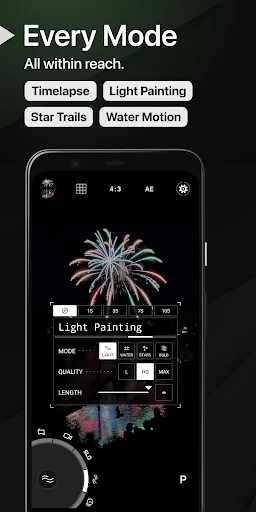
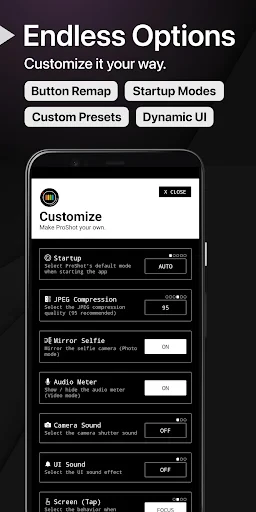
When it comes to capturing life's moments in stunning detail, most of us rely heavily on our smartphone cameras. But what if I told you there’s a way to elevate your smartphone photography to near-professional levels? Enter ProShot, an app that transforms your device into a powerful camera with an array of advanced features.
Unlocking Your Phone's Camera Potential
First things first, let’s dive into what makes ProShot a game-changer in the world of mobile photography. From the get-go, the app presents a user-friendly interface that’s inviting yet packed with features. Whether you’re a novice or a seasoned photographer, you'll find ProShot's design intuitive and easy to navigate.
Taking Full Control of Your Settings
One of the standout features of ProShot is the extensive manual control it offers. You can adjust the ISO, shutter speed, white balance, and exposure, much like a professional DSLR. This level of control means you can fine-tune your shots to perfection, adapting to various lighting conditions and creative scenarios.
Shooting in RAW for Better Editing
For those who love post-processing, the ability to shoot in RAW format is a huge plus. This feature allows you to capture all the data from the sensor, giving you the flexibility to edit your photos without losing quality. It’s like having a digital negative that you can tweak to your heart’s content.
Creating Stunning Videos
ProShot isn’t just for still photography enthusiasts. The app also excels in video recording, offering features like adjustable frame rates, resolution settings, and even time-lapse options. Whether you’re shooting a short film or just capturing everyday moments, ProShot provides the tools to do so with cinematic flair.
How Well Does the App Perform?
In terms of performance, ProShot is a solid contender. It runs smoothly on both Android and iOS devices, with minimal lag even when using its more advanced features. The app's developers have clearly put a lot of effort into ensuring it performs well across different platforms.
Keeping an Eye on Battery and Storage
It’s worth noting that using features like RAW shooting and high-resolution video can be taxing on your device’s battery and storage. Make sure you’re prepared with extra storage space and a power bank if you plan on using ProShot extensively during a shoot.
Is ProShot the Right App for You?
Overall, ProShot is a fantastic app for anyone serious about mobile photography. Its combination of professional-grade features and ease of use makes it a must-have for photographers looking to push the boundaries of what’s possible with a smartphone camera. Whether you're capturing stunning landscapes, candid portraits, or dynamic videos, ProShot provides the tools you need to make your vision a reality.
So, if you’re ready to take your photography to the next level, give ProShot a try. It’s like having a professional camera right in your pocket, ready to capture the world as you see it.
Advantages
- Offers full manual control over camera settings.
- High-quality RAW and JPEG output options.
- Intuitive and user-friendly interface.
- Supports 4K video recording.
- Customizable presets for quick access.
Disadvantages
- Requires a learning curve for beginners.
- Battery usage can be intensive.
- Limited post-processing features.
- Occasional app crashes reported.
- Not all features available on all devices.
Frequently Asked Questions
Q: What is ProShot and what features does it offer?
A: ProShot is a comprehensive camera app designed for both amateur and professional photographers. It offers a range of features including manual control over exposure, focus, shutter speed, and ISO. Users can shoot in RAW format, record 4K video, and utilize a variety of shooting modes such as time-lapse and burst mode, making it a versatile tool for capturing high-quality images and videos.
Q: Is ProShot user-friendly for beginners?
A: Yes, ProShot is designed to cater to both beginners and experienced photographers. While it offers advanced manual controls for seasoned users, the interface is intuitive enough for novices to navigate easily. The app provides guides and tips to help new users understand and utilize its features effectively, ensuring a smooth learning curve.
Q: Can I use ProShot on both Android and iOS devices?
A: ProShot is available for both Android and iOS platforms, ensuring a wide range of compatibility with various smartphones and tablets. Users can download the app from Google Play Store or Apple App Store, allowing them to enjoy its features irrespective of their device's operating system, as long as it meets the app's technical requirements.
Q: Does ProShot support video recording, and if so, what are its capabilities?
A: Yes, ProShot supports video recording with impressive capabilities. It allows users to record in high resolution, including 4K video, and offers manual control over filming parameters such as frame rate and bit rate. Additionally, ProShot includes features like video light, pause and resume, and external microphone support, making it suitable for both casual and professional videography.
Q: What are the system requirements for installing ProShot?
A: To install ProShot, your device must meet certain system requirements. For Android users, it typically requires Android 6.0 or higher, while iOS users need iOS 11.0 or later. The app also requires a minimum amount of free storage space and a compatible camera hardware to access all features. It's advisable to check the app store listings for detailed specifications.
Technical Information
Recommended for You

X Browser - Private & Fast

Pocket Broker - trading

Asana: Where work connects

Receipt Pal Scanner & Rewards

Themes

LEGO® DUPLO® Marvel

Authenticator App - SafeAuth

Skype

Lyft

Weather XL PRO

Realtime Charts for Torque Pro

Breaking News - Live Headlines

PhotoSync Bundle Add-On

Google Tasks

TodayTix – Theatre Tickets

Mileage Tracker by Everlance

Icon changer & Widget Themes

Tagofy - Geotag Map Camera

Google TV

Asiacell

ClapTrack: Find Your Phone Now

Online Portal by AppFolio

Uber - Driver: Drive & Deliver
