
myTuner FM Radio App
Listen To Global Radio Stations Anywhere
Screenshots
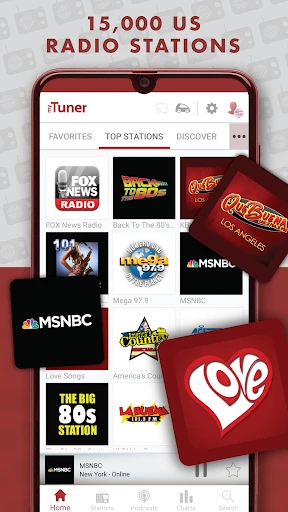


myTuner FM Radio App
Prepare to dive into the world of radio with myTuner FM Radio App, an app that’s got everyone humming to the tunes of their favorite stations across the globe. Whether you're a fan of pop, rock, jazz, or country, this app has got you covered. Let me walk you through my experience with it.
Your Guide to a World of Music
First off, let me tell you, navigating through myTuner FM Radio App is like a breeze. The interface is user-friendly and intuitive, so even if you’re not a tech whiz, you’ll feel right at home. The app features an extensive collection of over 50,000 radio stations from more than 200 countries. Yes, you read that right—50,000 stations! It’s like having the world’s radio in your pocket.
What struck me first was the sheer variety. From global stations to local gems, you can stream everything with just a tap. Searching for stations is super easy; you can filter by country, genre, or even by the top hits. And if you’re as indecisive as I am about music, the app’s trending section will steer you right to what’s hot.
Music On Your Own Terms
One of my favorite features is the ability to listen to radio stations offline. Yes, you heard it right! Simply save your favorite stations and enjoy them even when you’re off the grid. This is a game-changer for those long flights or remote road trips where data might be scarce.
I also love the alarm and sleep timer functions. Imagine waking up to your favorite tunes or falling asleep to the soothing sounds of jazz. It’s these little touches that make myTuner FM Radio App a must-have for music lovers.
What Makes This App Special
Now, what makes this app a standout in the crowded world of radio apps? For starters, the sound quality is impeccable. None of that distorted noise you sometimes get with online streams. The app developers seem to have nailed it in ensuring that the audio is crisp and clear, no matter where you are tuning in from.
Moreover, the app supports multiple platforms. Whether you’re an Android aficionado or an iOS enthusiast, myTuner FM Radio App has got you covered. It even syncs with smart devices, meaning you can enjoy your music on the go or at home with the same seamless experience.
In conclusion, if you’re on the hunt for a reliable, easy-to-use radio app that offers a massive selection of stations and excellent sound quality, look no further. With its user-friendly interface and unique features like offline listening, myTuner FM Radio App truly hits all the right notes. So go ahead, give it a spin and let the music play on
Advantages
- Wide variety of global radio stations.
- User-friendly interface and design.
- Offline listening feature available.
- Customizable playlists feature.
- Stable streaming with minimal buffering.
Disadvantages
- Contains ads in the free version.
- Limited features without subscription.
- Occasional app crashes reported.
- Some stations may not load.
- Not all stations have high audio quality.
Frequently Asked Questions
Q: What is myTuner FM Radio App?
A: myTuner FM Radio App is a comprehensive mobile application that allows users to listen to a wide range of radio stations from around the world. With access to over 50,000 radio stations from more than 200 countries and territories, it offers a diverse selection of music, news, sports, and talk shows. The app is designed for both Android and iOS devices, providing users with an intuitive interface and seamless streaming experience.
Q: Is myTuner FM Radio App free to use?
A: Yes, myTuner FM Radio App is free to download and use. However, it does offer in-app purchases and a premium version that provides additional features, such as ad-free listening and high-quality audio streaming. Users can choose to enjoy the free version with occasional ads or opt for the premium version for an enhanced listening experience.
Q: Can I use myTuner FM Radio App offline?
A: myTuner FM Radio App primarily functions as a streaming service, which means an internet connection is required to listen to radio stations. Currently, the app does not support offline listening or downloading of radio content. Users need to be connected to Wi-Fi or mobile data to enjoy uninterrupted streaming of their favorite stations.
Q: What features does myTuner FM Radio App offer?
A: myTuner FM Radio App offers a variety of features to enhance the user experience. These include the ability to search for stations by genre, country, or city, create a list of favorite stations for quick access, and set an alarm to wake up to your preferred station. Additionally, the app supports Chromecast and AirPlay, allowing users to stream radio content to compatible devices.
Q: How can I troubleshoot streaming issues on myTuner FM Radio App?
A: If you experience streaming issues on myTuner FM Radio App, there are several steps you can take to troubleshoot. First, ensure that your device has a stable internet connection. You may also try restarting the app or your device. If the problem persists, check for any available app updates or contact the app's support team for further assistance. Clearing the app's cache and checking your device's storage can also help resolve streaming problems.
Technical Information
Recommended for You

JusTalk Kids - Safe Messenger

Cloned Voices

Applied Ballistics Quantum

TuneIn Radio Pro - Live Radio

Wanderlog - Trip Planner App

Bird — Ride Electric

HairApp: Hair Styler App, Bald

Bitcoin Miner Cloud

iTunes

Baby + | Your Baby Tracker

Volleyball Rotations

AOL: Email News Weather

Car Key Smart Remote Connect

Kicker U

Headway: 15-Min Book Summaries

Financial Calculators Pro

Fluid Magic: 3D Live Wallpaper

Learn Fast & Speak Fluently

TeslaMirror

Video Lite

MyRadar Weather Radar

Weather app

Docusign - Upload & Sign Docs
