
Location Share
Live Location Sharing For Friends And Family
Screenshots


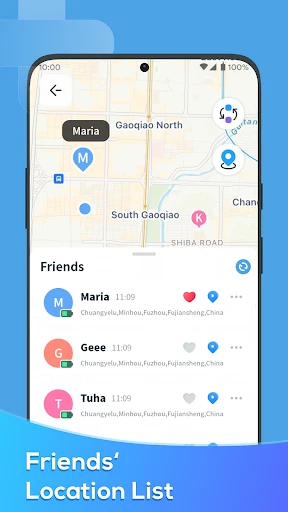
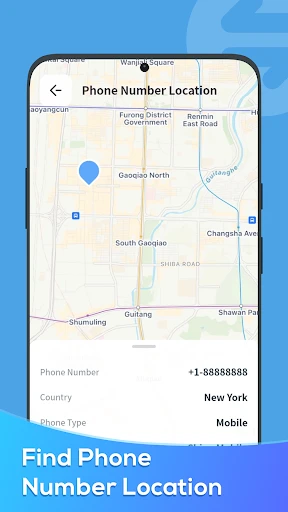
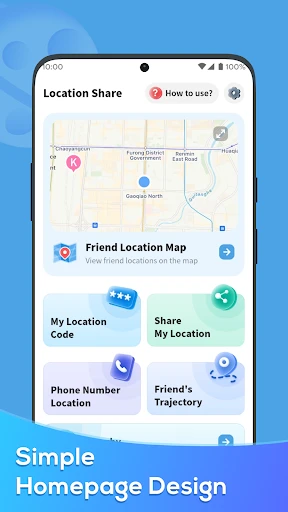
Have you ever found yourself in a situation where you needed to share your location, but it just seemed like a hassle? Well, let me introduce you to Location Share, an app that's here to make your life a whole lot easier. I recently downloaded it and gave it a whirl, and I've got some thoughts to share with you.
First things first, getting Location Share up and running was super simple. Right after I grabbed it from the app store, it asked to connect with my Google account. This was really handy because, honestly, who can remember another password?
The app's design is clean and not at all complicated. I like that it doesn't have a bunch of extra stuff I don't need. The home screen is easy to understand, showing a map with where I am and a big, clear button to share my spot. No fuss, it just works.
The whole point of this app is to share where you are, and I tested this by sending my location to a friend who was meeting me at a place we'd never been. I just hit the share button and got a bunch of choices for how to send it—text message, email, or apps like WhatsApp.
A really neat part is you can choose how long your location is visible to others. I picked one hour, which was perfect for my friend to find me without me having to remember to shut it off later. It's a great help for anyone who's a little scatterbrained.
Okay, I get it—you're probably wondering about safety and privacy. The app thinks about that, too. Location Share doesn't just send your location out to everyone. You're the one in charge of who gets to see it and for how long. On top of that, the app says your information is encrypted, which is definitely good to know these days.
I also noticed there's a list of everyone I've shared with in the past, which is useful if you want to check on your privacy. It's obvious the people who made this app really want users to feel safe.
After using Location Share for about a week, I can honestly say it's a useful app to keep on your phone. Whether you're coordinating with friends or just letting family know you're okay, it does what it says it will. The app isn't full of annoying ads, which is a massive bonus for me.
Sure, it doesn't have a million extra features, but that's actually why I like it. It focuses on one job and does it really well. In a time when so many apps try to do everything, it's nice to find one that knows exactly what it's for.
So, if you want a simple, no-fuss app for sharing your location, you should check out Location Share. It's free, easy to figure out, and best of all, it helps you feel secure. Just don't forget to stop sharing your location when you're finished
Advantages
- Easy to use interface for all users.
- Real-time location tracking feature.
- Low battery consumption.
- Works with weak internet connections.
- Allows location sharing with non-users.
Disadvantages
- Privacy concerns over data sharing.
- Occasional app crashes reported.
- Limited features in free version.
- High battery usage during continuous tracking.
- Requires internet for accurate tracking.
Frequently Asked Questions
Q: What is Location Share and how does it work?
A: Location Share is an app designed to allow users to share their real-time location with friends and family. By using GPS technology, users can send their exact location, which can be viewed on a map interface. This feature is particularly useful for coordinating meet-ups, ensuring safety during travel, or simply keeping loved ones informed of your whereabouts.
Q: Is Location Share safe to use in terms of privacy?
A: Location Share prioritizes user privacy by employing end-to-end encryption for all location data shared through the app. Users have full control over who can view their location and can revoke access at any time. Additionally, the app does not store your location history, further ensuring that your data remains private and secure.
Q: Can I use Location Share without an internet connection?
A: Location Share requires an active internet connection to share real-time location data. While the app uses GPS to determine your location, sending this information to others relies on either Wi-Fi or mobile data. Without an internet connection, users cannot update their location or receive updates from others.
Q: Does Location Share consume a lot of battery power?
A: Location Share is designed to be energy-efficient, but like any app that uses GPS, it can have a noticeable impact on battery life. The app minimizes battery drain by using smart algorithms to update location data only when necessary. Users can also adjust the frequency of updates to further conserve battery life.
Q: Is Location Share available on both Android and iOS platforms?
A: Yes, Location Share is available for download on both Android and iOS devices. Users can find the app on the Google Play Store for Android devices and the Apple App Store for iOS devices. The app provides a consistent user experience across both platforms, ensuring that all users can take advantage of its features regardless of their device.
Technical Information
Recommended for You

Apps 4 Chromecast & Android TV

Slack

New Era Cap

AI Mail Home- Email Homescreen

iRobot Home (Classic)

TurboSpeed: Game Mode FPS

Fandango at Home

Eerskraft Dungeon Maze

Minecraft Education

Tattoo Design & Tattoo Maker

TrendClean - Storage Cleaner

MLB Ballpark

Metrolink

Preglife - Pregnancy Tracker

Texas Roadhouse

Live Wallpaper - Wallpapers 4K

Perfect Viewer Donation

avianca

PaperColor

Color Genie

Alibaba.com - B2B marketplace

Zomato: Food Delivery & Dining

Zumper - Apartment Finder
