
Slack
Team messaging for modern business collaboration
Screenshots


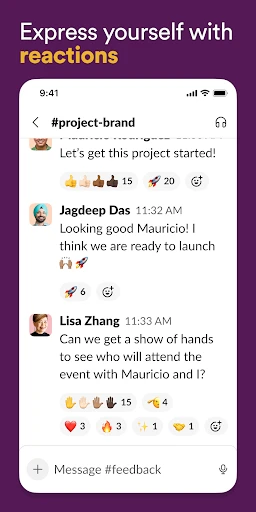
Ever felt like your email inbox is just a little too crowded? Or maybe those endless threads make you want to pull your hair out? Enter Slack, the communication app that’s been a game-changer for teams across the globe. Let’s dive into what makes Slack a must-have for any team.
Getting Familiar with the Slack Platform
First things first, Slack is like that cool kid in school who seems to have it all. It’s a messaging app designed for teams, offering a platform to collaborate effortlessly, whether you’re all in the same office or spread across different time zones. It’s available on both Android and iOS, so no one’s left out of the loop.
Channels: The Core of Team Communication
Think of channels as little virtual rooms dedicated to specific topics or projects. This is where the magic happens. Instead of sifting through a pile of emails, you just pop into the relevant channel and catch up on what’s going on. It’s like having a dedicated space for every conversation, so nothing gets lost in translation.
What I love about channels is how customizable they are. You can create public channels for everyone in the company or private ones for more sensitive topics. Plus, joining or leaving a channel is just a click away, making it super flexible.
Sending Private Messages to Team Members
Need to have a one-on-one with a colleague? Slack’s got you covered with Direct Messages. It’s as simple as texting but right within the app. You can even create group DMs if you need to loop in a couple of people on a quick conversation without creating a whole new channel.
Connecting Your Favorite Apps and Tools
Here’s where Slack really shines – integrations. The app supports a plethora of third-party services, from Google Drive and Trello to GitHub and Zoom. This means you can pull in files, check task updates, or even start a video call without leaving Slack. It’s like having all your work tools under one roof.
And the best part? Setting up these integrations is a breeze. Even if you’re not super tech-savvy, Slack makes it easy to connect and manage your favorite apps.
Finding Anything Quickly with Search
Let’s be honest, we’ve all experienced the frustration of trying to find that one message from weeks ago. Slack’s search feature is a lifesaver. It’s fast, efficient, and helps you locate messages, files, and even links in no time. So, no more endless scrolling!
Tailoring Your Alert Preferences
There’s nothing worse than being bombarded with notifications. Thankfully, Slack lets you customize notifications to suit your needs. Whether you want to mute specific channels or set a Do Not Disturb schedule, Slack gives you the control to stay focused without missing out on the important stuff.
What’s more, you can even set keyword alerts. So, if there’s a particular project or topic you’re keen on, Slack will give you a nudge whenever it’s mentioned. How neat is that?
Wrapping Up Our Look at Slack
In a world where communication is key, Slack stands out as a robust tool that brings teams together. It’s intuitive, flexible, and packed with features that cater to both small teams and large enterprises. Whether you’re managing projects, sharing files, or just catching up with coworkers, Slack makes it all feel seamless.
So, if you’re tired of drowning in emails and looking for a streamlined way to keep your team connected, give Slack a whirl. It might just be the productivity boost you’ve been searching for.
Advantages
- Seamless team communication
- Integrates with many tools
- User-friendly interface
- Customizable notifications
- Strong search functionality
Disadvantages
- Can be overwhelming with notifications
- Limited free version features
- Occasional message delays
- Requires stable internet
- No offline access to messages
Frequently Asked Questions
Q: What is Slack and what are its main features?
A: Slack is a collaboration hub that connects your work with the people you work with. It offers channels for organizing conversations, direct messaging for quick communication, file sharing for easy collaboration, and integration with various apps. It also supports voice and video calls, making it an all-in-one communication tool for teams.
Q: Is Slack suitable for small businesses as well as large enterprises?
A: Yes, Slack is highly scalable and can be customized to fit the needs of both small businesses and large enterprises. It provides flexible plans that cater to different team sizes and requirements. Whether you're a small startup or a large corporation, Slack offers tools that enhance productivity and streamline communication.
Q: How secure is Slack for business communications?
A: Slack takes security very seriously, offering features such as data encryption in transit and at rest, two-factor authentication, and single sign-on. It complies with industry-standard security practices, ensuring that your business communications and data are protected. Slack also provides enterprise-grade security for larger organizations.
Q: Can Slack integrate with other apps and services we already use?
A: Absolutely! Slack supports integration with over 2,400 apps, including Google Drive, Microsoft Office 365, Trello, and more. These integrations allow you to streamline your workflow by bringing all your tools into one place. Custom integrations can also be developed using Slack's API to meet specific business needs.
Q: What are some potential drawbacks or limitations of using Slack?
A: While Slack offers a robust platform for collaboration, it may become overwhelming with notifications if not properly managed. Users might find the interface a bit cluttered, especially in larger teams with numerous channels. Additionally, some advanced features are only available in higher-tier paid plans, which might be a consideration for budget-conscious users.
Technical Information
Recommended for You

TV (Samsung) Remote Control


Galaxy S9 Plus Ringtones

Cold Stone®

Screen Recorder Video Recorder

Volume Styles - Custom control

Star Tracker - Mobile Sky Map

Voice Recorder Sound Memo Pro

iNaturalist

EMT PASS- NEW

EpicWalls

ReelShort - Stream Drama & TV

Buffalo Wild Wings Ordering

Voice Changer by Sound Effects

Palmstreet - Live shopping

Shop Samsung

Knott's Berry Farm

Mods&Skins for Melon

Music Player & MP3 - MMusic

Mercado Libre: Compras online

Breeze Airways

Facer Watch Faces

JusTalk Kids - Safe Messenger
