
NDI HX Camera: Easy Streaming
Wireless video streaming for mobile creators
Screenshots

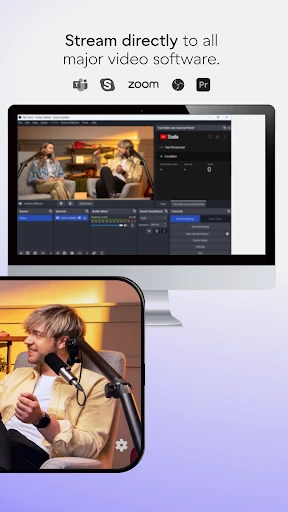

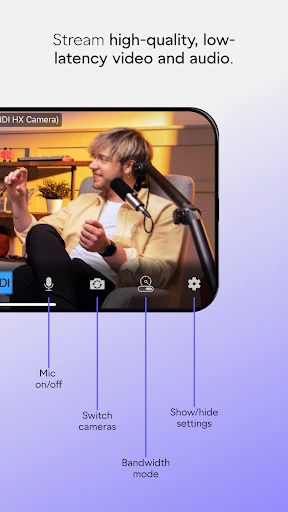

Transform Your Smartphone into a Pro Streaming Camera with NDI HX Camera
Hey there, fellow tech enthusiasts! If you’re searching for a handy app that turns your phone into a professional camera for streaming, you should definitely check out the NDI HX Camera. This clever app is making waves for how easily it integrates your phone into a streaming setup. Let’s explore what makes this app so special.
So, What Exactly is This App?
First off, let's get into what this app actually does. NDI HX Camera is built to turn your iOS or Android device into a high-quality network camera. It uses the NDI (Network Device Interface) protocol, which is a major standard in the broadcasting industry. Essentially, this app lets you send video over your local network to any device that can receive an NDI signal. Pretty neat, huh?
Think about being able to stream live events, record vlogs, or host webinars straight from your phone with pro-level quality. That's the promise of NDI HX Camera.
Getting Started is a Breeze
Getting NDI HX Camera up and running is surprisingly simple, even if you're not super tech-savvy. After you download the app from the App Store or Google Play, the installation is a snap. Just follow the prompts on your screen, and you'll be ready in minutes.
Once it's installed, connect your phone to the same Wi-Fi network as your NDI receiver. Open the app, and just like that, your smartphone becomes a camera ready to stream. The interface is user-friendly, with simple controls that are easy for anyone to figure out.
How Well Does It Work and What Can It Do?
Now, let's chat about performance. The video quality is seriously good, supporting resolutions all the way up to 4K, assuming your phone can handle it. The delay is minimal, which is absolutely vital for live streaming. Nobody wants a choppy broadcast, right?
A key strength is its ability to work with popular broadcasting software like OBS Studio and Wirecast, making it a flexible tool for creators. It also supports both landscape and portrait modes, so you can choose what fits your stream best.
* High-quality video: Supports up to 4K resolution.
* Low latency: Provides a smooth, lag-free stream.
* Flexible orientation: Broadcast in landscape or portrait.
* Broad compatibility: Works with most major broadcasting software.
What's It Like to Use?
From a user's point of view, NDI HX Camera is a pleasure to use. It's clear the developers focused on making the app as straightforward as possible. The layout is clean and simple, keeping the focus right where it should be—on your video feed.
While the app generally runs smoothly, its performance does rely heavily on your network's strength. A spotty Wi-Fi connection can cause some hiccups in the video, which can be frustrating. So, it's a good idea to make sure you have a strong and stable internet connection before you start streaming.
Wrapping It All Up
All things considered, NDI HX Camera is an excellent app for anyone looking to get serious about mobile streaming. It effectively closes the gap between casual and professional broadcasting, bringing high-quality video to anyone with a smartphone. Whether you're a streaming veteran or a beginner wanting to try live video, this app is absolutely worth testing out.
So, if you're eager to upgrade your streaming setup, give NDI HX Camera a try. You might be amazed by the power hiding in your pocket. Happy streaming
Advantages
- High-quality video streaming capability.
- Compatible with multiple platforms.
- User-friendly interface.
- Low latency performance.
- Supports various resolutions.
Disadvantages
- Requires stable internet connection.
- Can drain battery quickly.
- Limited features in free version.
- May need additional hardware.
- Subscription can be costly.
Frequently Asked Questions
Q: What is NDI HX Camera and how does it work?
A: NDI HX Camera is an application that transforms your mobile device into a high-quality wireless video camera. It uses NDI technology to stream video directly to your computer or other devices over a Wi-Fi network. This makes it ideal for live streaming, broadcasting, or recording purposes, offering convenience and flexibility without needing additional hardware.
Q: Is NDI HX Camera compatible with all smartphones and devices?
A: NDI HX Camera is designed to be compatible with a wide range of iOS and Android devices. However, it is crucial to check the specific device requirements and compatibility on the app store before downloading. The app performs best on newer devices with updated operating systems to ensure smooth and efficient streaming capabilities.
Q: What are the main features of NDI HX Camera?
A: NDI HX Camera includes features such as high-quality video streaming, low-latency performance, and integration with various broadcasting software. It allows users to switch between front and rear cameras, adjust video settings, and utilize advanced encoding options. These features make it a versatile tool for professional and amateur content creators.
Q: Is there a cost associated with using NDI HX Camera?
A: NDI HX Camera may come with a purchase price or subscription fee, depending on the platform. While it offers a powerful set of features, users should review the pricing details on the app store or the official website. Often, the cost reflects the app’s professional-grade streaming capabilities and support.
Q: How secure is the NDI HX Camera for streaming video?
A: The NDI HX Camera app prioritizes user security by ensuring encrypted video transmission over networks. It uses secure protocols to protect your data during streaming sessions. However, users should always ensure they are connected to secure and trusted Wi-Fi networks to maximize protection against unauthorized access or data breaches.
Technical Information
Recommended for You

Yolla: International Calling

HuntWise: A Better Hunting App

GPS Emulator

Family Space

All Invitation Card Maker App

F1 TV

Public – Stocks and Options

USHUD Foreclosure Home Search

Fotorama - AI Photo Generator

Electrify America

MSNBC: Watch Live & Analysis

AdBlock for Samsung Internet

Tracker Detect (Anti-Stalking)

Gaming Mode - Game Booster PRO

Pregnancy App & Baby Tracker

Phone Mirror app - True Mirror

BambooHR

Tarot!

AppBarber: Cliente

Dreame-Read Romance Stories

HaloVPN: Fast Secure VPN Proxy

Infinite Painter

Turbolearn - AI Note Taker
