
Ancestry: Family History & DNA
Discover your family story with DNA testing
Screenshots


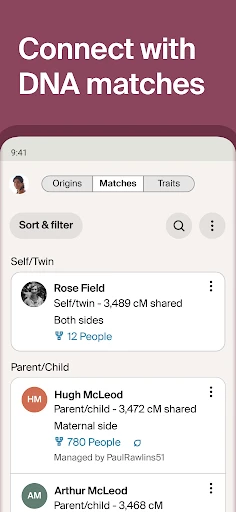

Ancestry: Family History & DNA
Have you ever been curious about your family's past and where your ancestors originally lived? That's the whole idea behind Ancestry: Family History & DNA. Let me walk you through this app, which aims to uncover the secrets of your heritage with just a few taps on your phone.
First Look and Getting Started
Right from the start, Ancestry has a good-looking and easy-to-use design. Moving around the app feels like browsing a modern, digital family scrapbook. The sign-up is straightforward, letting you begin by exploring your family tree or jumping right into a DNA test. The design is neat, and I have to say, it's made so that even people who aren't great with technology won't have any trouble using it.
Building Your Family Tree
After you sign up, the real adventure starts. You can create a family tree by putting in names, important dates, and even adding old documents or pictures. This tool is very thorough, and it's really cool to see your family's story come together with every new fact you add. I spent hours looking into possible family links and finding relatives I never knew about. The connection to historical archives is smooth, giving you a huge collection of things like old census records and official certificates. It's like having your own personal history expert right in your pocket!
Finding and Talking to Family Members
A really great part of the app is how it helps you find and get in touch with relatives who are also members. It's surprising how tech can help families connect, and Ancestry is very good at this. You can exchange messages, share family tales, and work together on the same family tree. This social feature makes researching your family history much richer, turning it into a shared project.
Understanding Your DNA Story
If just making a family tree isn't enough for you, Ancestry also provides a DNA test to learn about your genetic background. It's a simple process: you request a test kit, mail in your sample, and then wait for your report. When it's ready, the app shows you a detailed look at your ethnic background and finds potential genetic relatives. It's really exciting to discover the different parts of the world your family comes from, and the app explains the genetics in a way that's easy for anyone to understand.
A Note on Your Data and Privacy
Naturally, when you share a lot of personal information, privacy is a big topic. Ancestry is generally clear about its privacy rules, stating that they work to keep your data safe and use it responsibly. Even so, it's a smart idea to look over their privacy terms yourself to see how your information could be used. I felt their security measures were solid, but it's definitely something to think about before you start genetic testing.
Wrapping Up the Experience
In conclusion, Ancestry: Family History & DNA is a fantastic resource for anyone interested in their family's origins. It's more than just an application; it's a personal trip into your history that is both educational and fun. No matter if you're a seasoned family historian or just starting to explore, this app has plenty to offer. So, why not try it out and discover your own family's path? Sometimes, understanding our past can help us figure out our future.
Advantages
- Comprehensive ancestry database
- User-friendly interface
- Interactive family tree builder
- DNA testing integration
- Regular content updates
Disadvantages
- Subscription can be pricey
- Requires internet access
- Privacy concerns with DNA data
- Complex for beginners
- Some features are region-locked
Frequently Asked Questions
Q: What features does the Ancestry app offer for family history research?
A: The Ancestry app offers a plethora of features for family history enthusiasts, including access to billions of historical records, the ability to build and edit your family tree, and hints that suggest possible matches in historical records. It also provides access to details from your DNA matches if you have taken an Ancestry DNA test. Additionally, the app allows for easy sharing of your discoveries with family and friends.
Q: How does the DNA testing process work with the Ancestry app?
A: To utilize the DNA features of the Ancestry app, users must first purchase an Ancestry DNA kit. Once the kit arrives, you provide a saliva sample and send it back for analysis. Results are accessed through the app, providing insights into your ethnic origins and connecting you with potential relatives based on genetic matches. The app gives you detailed ethnicity estimates and possible migration paths of your ancestors.
Q: Is it possible to use the Ancestry app without a subscription?
A: While some features of the Ancestry app can be accessed for free, such as building a basic family tree and viewing some public family trees, a subscription is required to access most historical records and detailed features. Subscription plans vary, offering different levels of access to records and databases, making it a more comprehensive tool for serious genealogical research.
Q: Are the family trees and DNA data shared on the Ancestry app secure and private?
A: Ancestry takes the privacy and security of your data seriously. Users have control over their privacy settings, including who can view their family tree. DNA results are private by default, and users choose if and how they want to connect with DNA matches. Ancestry also complies with strict data protection regulations and has measures in place to protect user data from unauthorized access.
Q: Can I collaborate with others on my family tree using the Ancestry app?
A: Yes, the Ancestry app supports collaborative features, allowing users to invite family members to view and edit their family tree. This can be a valuable tool for families working together to explore their genealogy. Invitees can contribute information, photos, and stories, making it a collaborative project. Users can manage permissions to control who can edit or view the tree.
Technical Information
Recommended for You

QuickEdit Text Editor Pro

Paylocity

Air Traffic - flight tracker

Simply Guitar - Learn Guitar

ValeroPay+

Real Wrestling Rumble Fight

Listen Audiobook Player

BabySleep: Whitenoise lullaby

ArtCanvas: Learn how to draw

Murder Mystery 2 Aid

Circle

Servers for Minecraft PE Tools

SketchPad - Doodle On The Go

Phone Mirror app - True Mirror

Download Hub, Video Downloader

BlueDriver OBD2 Scan Tool

iSharing: GPS Location Tracker

Live Launcher Lite-3Dwallpaper

Toters: Food Delivery & More

Mangamello - مانجاميلو

Human Health Tracker

MD Vinyl - Music Player Widget

Neon Love Theme
