
Show My Colors: Color Palettes
Color palettes for designers and creative professionals
Screenshots



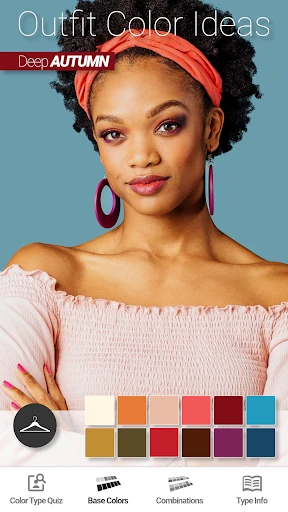
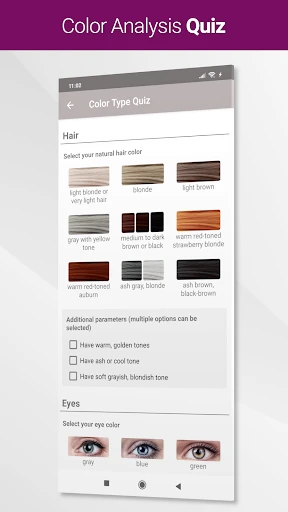
Show My Colors: Color Palettes
Have you ever looked at a gorgeous sunset or a bright flower bed and wished you could use those exact colors in your own work? That's the whole idea behind Show My Colors: Color Palettes. This clever app is a fantastic tool for designers, artists, or anyone who loves the colors they see in the world around them.
Discovering the World of Colors
First up is the app's main job: grabbing color schemes from your environment. Just point your phone's camera at anything you like, and bam! The app immediately creates a color palette from what it sees. It's like having a little color expert right in your pocket, always ready to give you ideas.
What's really great about Show My Colors is how easy it is to use. Even if you're not great with technology, moving around the app feels as simple as looking through your photos. The layout is clean and simple, so you aren't bombarded with too many choices. It just focuses on doing its main job perfectly—finding and showing you color palettes.
Features That Stand Out
One feature I really like is being able to save and sort your palettes. You can make different groups for themes, projects, or even how you're feeling. Loved the colors from your last beach day? Save those ocean blues and sand tones in a "Beach Vibes" folder. Working on redesigning a room? Start a "Living Room Makeover" palette. This makes it super easy to find and use your favorite color sets later on.
Plus, Show My Colors works well with other design apps. You can send your palettes directly to programs like Adobe Photoshop, which helps it fit right into your creative process.
Exploring Beyond the Basics
It does more than just grab colors; it also teaches you about them. The app gives you details for each color, like its HEX, RGB, and CMYK codes. If you work on both digital and printed projects, having this info ready is incredibly useful. The app also gives you tips on colors that go well together or provide good contrast, helping you make smarter design choices.
If you enjoy getting ideas from other people, you'll like the sharing feature. You can show off your own palettes and check out ones made by other users. It's a wonderful way to discover new inspiration and see how other people view the world of color.
Wrapping It Up
All in all, Show My Colors: Color Palettes is more than just an app; it's a partner for your creativity. Whether you design for a living or just like to play with color, this app provides tools that are both strong and easy to use. It perfectly connects the real world to your digital projects, making it simpler than ever to bring the colors we see every day into our creative work.
So, if you want to add some new life to your creative projects or just feel like exploring the amazing colors all around us, you should try Show My Colors. It's like putting on a pair of glasses that let you see the world in a more colorful way, and who wouldn't love that?
Advantages
- Intuitive interface for easy color selection.
- Wide range of palettes for diverse needs.
- Custom palette creation for unique projects.
- Smooth integration with design tools.
- Fast performance with minimal lag.
Disadvantages
- Limited free features without subscription.
- Occasional bugs in color rendering.
- No offline mode available.
- High battery usage on prolonged use.
- Ads in free version can be distracting.
Frequently Asked Questions
Q: What is Show My Colors: Color Palettes?
A: Show My Colors: Color Palettes is an innovative app designed to help users create, customize, and share beautiful color palettes. Whether you're a designer, artist, or simply someone who loves experimenting with colors, this app provides a wide range of tools and features to explore hues and create stunning palettes for any project.
Q: How do I create a color palette in Show My Colors?
A: To create a color palette in Show My Colors, simply open the app and select the 'Create Palette' option. You can choose colors manually or use the app's color picker tool to select colors from images. Once your palette is created, you can save it, share it, or use it in your design projects.
Q: Can I use Show My Colors: Color Palettes for professional design work?
A: Yes, Show My Colors: Color Palettes is suitable for both personal and professional use. The app offers advanced features like color harmonies, gradient tools, and export options that are ideal for professional designers. It supports various file formats, ensuring that your palettes can be seamlessly integrated into any design workflow.
Q: Is Show My Colors: Color Palettes available for both Android and iOS devices?
A: Yes, Show My Colors: Color Palettes is available for download on both Android and iOS platforms. You can find the app on Google Play Store for Android devices and the Apple App Store for iOS devices. Ensure your device meets the minimum system requirements for optimal performance.
Q: Does Show My Colors: Color Palettes offer a free version?
A: Yes, Show My Colors: Color Palettes offers a free version that includes basic features for creating and managing color palettes. For users who need more advanced tools and functionalities, there is a premium version available through in-app purchases. The premium version unlocks additional features like custom color libraries and enhanced sharing options.
Technical Information
Recommended for You

Weather Forecast - Live Radar

Wepod | ویپاد

Launcher OS - Themes & Widgets

Color Pop - Fun Coloring Games

Life Palmistry - Palm&Gender

Live Earth Map: Street View 3D

1800 Contacts - Lens Store

Voice Recorder Sound Memo Pro

Hindi News by Dainik Bhaskar

Reels Maker for Instagram BEAT

KJV Bible: Audio+Verse

Fresha for customers

Graffiti Name Logo Maker

Weather Complications: Wear OS

GroupMe

Famio: Connect With Family

Bible For Women-Holy Bible App

AI Video Maker - Renderforest

Mp3 Music Downloader

Prepware Airframe

Groovepad - music & beat maker

Pray Daily - KJV Bible & Verse

Smart Remote For Vizio TV
