
Groovepad - music & beat maker
Create Music Beats For Everyone
Screenshots


Unleash Your Inner DJ with Groovepad
Ever found yourself tapping your fingers to an imaginary beat while daydreaming about being a DJ? Well, meet your new best friend: Groovepad - music & beat maker. This nifty app lets you unleash your inner musician, even if you’ve never touched an instrument before.
Your Pocket-Sized Music Studio
Groovepad is like having a mini studio right in your pocket. When I first opened the app, I was greeted with a sleek, colorful interface that practically invites you to start mixing. You can choose from a wide array of music genres, from hip-hop to EDM, house, and even dubstep. Whatever your musical taste, Groovepad has got something to get your head bobbing.
Making Beats is a Breeze
Now, I know what you might be thinking: "I’m no musician, how am I supposed to create tracks?" Fear not! Groovepad is designed with beginners in mind. Each genre comes with pre-loaded sound packs. All you have to do is tap on the pads to layer beats, loops, and vocals. It’s almost like playing a game, and before you know it, you’re crafting a track that sounds like it could be on the radio.
The app also features a tutorial mode that guides you through the basics, making sure you’re not left scratching your head. And for those who like a little more control, you can tweak and customize your sounds to suit your style. It’s intuitive and simple, yet surprisingly powerful.
A Playground for Your Musical Ideas
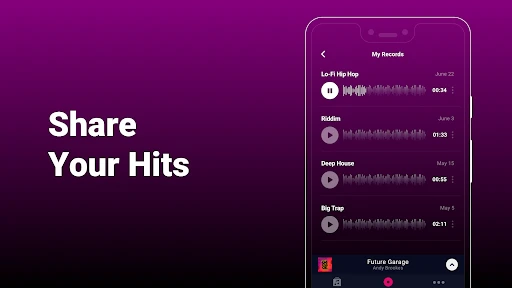
What really struck me about Groovepad is the creative freedom it offers. You can mix and match sounds to create something truly unique. Plus, the app allows you to record your sessions. This means you can capture that perfect beat when inspiration strikes and share it with your friends or on social media.
Another cool feature is the library of effects you can add to your tracks. From reverb to delay, these effects can transform a simple beat into something epic. It’s like having a virtual effects pedalboard at your disposal.
Is Groovepad Worth Your Time?
In the end, Groovepad is a fun and engaging app for anyone looking to dive into the world of music production. Whether you’re a complete novice or someone with a bit more experience, there’s plenty to explore and enjoy. It’s perfect for killing time creatively or even for serious beat making.
So, if you’re ready to drop some beats and impress your friends with your DJ skills, Groovepad is the way to go. It’s a pocket-sized powerhouse that turns music creation into a delightful, accessible experience. Give it a whirl and watch as you transform from a casual music lover to a beat-making maestro, one tap at a time.
Advantages
- User-friendly interface for beginners.
- Wide range of sound packs available.
- High-quality audio output.
- Frequent updates with new features.
- Supports exporting creations easily.
Disadvantages
- Limited features in free version.
- Ads can be intrusive at times.
- Requires internet for some features.
- Occasional app crashes reported.
- Some sound packs are paid.
Frequently Asked Questions
Q: What is Groovepad and how does it work?
A: Groovepad is a user-friendly music and beat-making app that allows users to create their own tracks with ease. It features a wide variety of sound packs in different genres, enabling users to mix and match beats, loops, and instruments. The app is designed for both beginners and experienced musicians, providing intuitive controls and real-time effects to enhance music creation.
Q: Is Groovepad free to use, and are there any in-app purchases?
A: Groovepad is available for free download on both Android and iOS platforms. While the app itself is free, it offers in-app purchases that unlock additional features, sound packs, and an ad-free experience. Users can enjoy the basic features without spending money, but premium content provides more options for music creation and customization.
Q: Can I use Groovepad offline, or do I need an internet connection?
A: Groovepad requires an internet connection to download new sound packs and updates. However, once the sound packs are downloaded, users can create and save their music offline. This allows for flexibility and convenience, enabling users to work on their music projects without continuous internet access.
Q: Who can benefit from using Groovepad?
A: Groovepad is designed for a wide range of users, including beginners who are new to music production and experienced musicians looking for a portable tool. It's ideal for anyone interested in creating music on-the-go, experimenting with different sounds, or producing high-quality tracks without the need for expensive equipment. Its intuitive interface makes it accessible to users of all skill levels.
Q: Does Groovepad provide any tutorials or support for new users?
A: Yes, Groovepad offers tutorials and guidance to help new users get started with the app. The tutorials cover the basics of music and beat-making, offering tips on how to use various features effectively. Additionally, the app includes a support section where users can find answers to common questions and troubleshoot issues, ensuring a smooth user experience.
Technical Information
Recommended for You

YoWindow Weather and wallpaper

Audible: Audio Entertainment

Mods&Skins for Melon

Pregnancy Test App Quiz

Freebie Alerts: Free Stuff App

Christmas Wallpaper

@Voice Premium License

Step: Instant Cash and Rewards

Jet VPN: VPN Fast & Secure

Weather Radar - Windy, rain ra

DailyPay On-Demand Pay

What The Forecast

Teladoc Health

IAA Buyer Salvage Auctions

My Molina

Careem: Rides, Food & more

Sad ringtones phone 2024

AR Drawing : Trace Anything

Google Maps Go

CamToPlan

YouTube Kids

Bath & Body Works

Jooble — Job Search App
