
Flowbird Parking
Smart Parking Payments For City Drivers
Screenshots


Flowbird Parking: Your Guide to Stress-Free Parking
Hey there! Today, I’m diving into the world of parking with this nifty app called Flowbird Parking. Let me walk you through what it’s all about and why it might just become your new best friend when it comes to finding that perfect parking spot.
Getting Your Flowbird App Ready
So, you know that feeling when you’re driving around in circles, desperately searching for a parking spot and your patience is wearing thin? Yeah, we’ve all been there. Flowbird Parking aims to take that stress away by letting you find and pay for parking right from your phone. Pretty cool, right?
Setting up Flowbird is a breeze. Just download it from your app store, and you’re good to go. The interface is super intuitive, which means you spend less time fiddling with the app and more time enjoying your day. It’s available for both Android and iOS, so no worries about compatibility here.
How the App Finds Your Perfect Spot
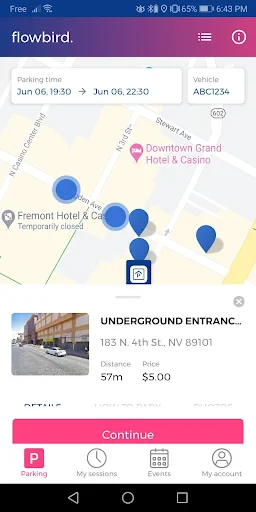
One of the standout features of Flowbird is its location tracking. It pinpoints where you are and shows you all the available parking spaces nearby. No more guessing games. You can even see the rates and choose what fits your budget. Plus, it’s constantly updated, so you’re not wasting time driving to a spot that’s already taken.
What’s even better? Flowbird remembers your favorite spots. It’s like having a personal parking assistant who knows exactly where you want to go. Just mark your preferred locations, and the app will keep them handy for next time.
Paying for Parking Without the Hassle
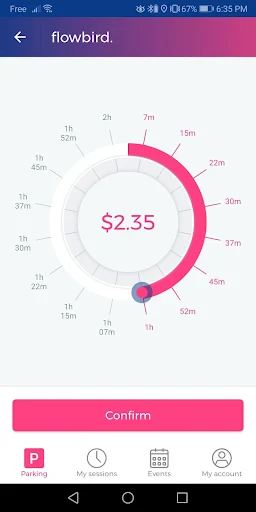
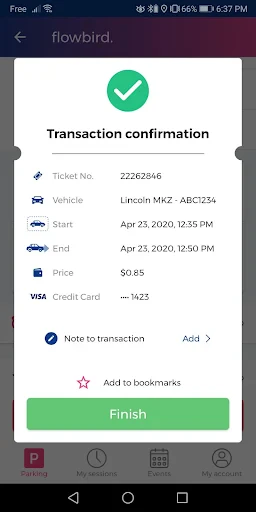
Say goodbye to scrambling for coins or dealing with those pesky parking meters. With Flowbird, you can pay directly through the app. Just link your credit card or use your preferred payment method, and you’re all set. It’s secure, fast, and saves you the headache of dealing with cash.
Oh, and if you’re worried about your parking expiring while you’re still shopping or dining, fear not! Flowbird sends you reminders before your time is up, and you can extend your parking session with just a few taps. No more racing back to your car in a panic!
Helping You and the Planet
If you’re keen on being eco-friendly, you’ll love this: Flowbird also provides options for finding parking near public transport stations. It encourages you to park your car and take the bus or train, reducing your carbon footprint. It’s a small step, but every bit helps, right?
Moreover, Flowbird is part of a larger community effort to make cities more accessible and less congested. By using the app, you’re contributing to smarter urban planning and helping make your city a better place to live.
In conclusion, Flowbird Parking is a game-changer for anyone looking to simplify their parking woes. Whether you’re in a hurry or just want to avoid the hassle of traditional parking methods, this app has got your back. So, next time you’re heading out, give it a go and see how it transforms your parking experience. You might just wonder how you ever lived without it
Advantages
- User-friendly interface for easy navigation
- Real-time parking availability updates
- Secure payment options with multiple methods
- Wide coverage in various cities
- Customizable notifications for parking expiration
Disadvantages
- Limited offline functionality
- Occasional GPS inaccuracies
- High data usage in some areas
- Requires constant app updates
- Dependence on strong internet connection
Frequently Asked Questions
Q: What is Flowbird Parking and how does it work?
A: Flowbird Parking is a mobile application designed to simplify the process of finding and paying for parking. Users can locate available parking spaces in real-time through the app, and pay for them using their mobile device, eliminating the need for cash or parking meters. The app integrates with local parking systems to provide updated information and a seamless parking experience.
Q: Is Flowbird Parking available in my city?
A: Flowbird Parking is available in many cities across the globe. To find out if the app is available in your area, you can visit the app's website or check within the app itself by entering your city or zip code. The app continues to expand its coverage, so even if it's not currently available in your area, it might be soon.
Q: How do I pay for parking using Flowbird Parking?
A: To pay for parking with Flowbird Parking, first download and install the app on your smartphone. Once registered, you can search for available parking spaces in your vicinity. When you find a suitable spot, you can pay directly through the app using a credit or debit card, or other supported payment methods. The app will send notifications about your parking session and allow you to extend time if needed.
Q: What security measures does Flowbird Parking use to protect my payment information?
A: Flowbird Parking utilizes advanced security protocols to protect your payment information. The app employs encryption and other security measures to ensure that your data is safe from unauthorized access. Additionally, Flowbird Parking complies with industry standards and regulations to provide a secure and reliable payment experience for all users.
Q: Can I extend my parking session using Flowbird Parking?
A: Yes, Flowbird Parking allows users to extend their parking sessions directly through the app. If you need more time, simply open the app and navigate to your active parking session. From there, you can add additional time, provided it is within the parking regulations of the area. This feature helps to avoid fines and offers flexibility in managing your parking needs.
Technical Information
Recommended for You

Perpay - Shop and Build Credit

Pawp: 24/7 Vet & Pet Care

JBL Headphones

Purrrr

Craftsman Building Sim Games

RadarOmega

Remote for Apple TV

Kobo | eBooks & Audiobooks

Quick Clean - Space Cleaner

TP-LINK tpCamera

Apple Carplay

CoinMarketCap: Crypto Tracker

Hole19 Golf GPS & Range Finder
Flowbird Parking

Wasatch Backcountry Skiing Map

Find My Phone: Phone Locator

Sad ringtones phone 2024

djay - DJ App & Mixer

TrustDial: Caller, SMS & Block

Dazzly: Color by Number Game

FamilyWall: Family Organizer

Kia Access

Jerry: The AllCar™ App
