
Classic Words Plus
Word puzzle game for family fun and vocabulary building
Screenshots
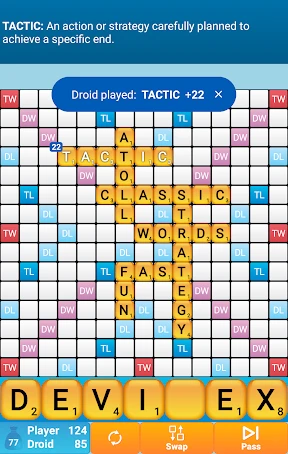


Hey there, word game enthusiasts! If you’re a fan of classic word games and love the idea of having a challenging yet fun word puzzle in your pocket, then you might want to check out Classic Words Plus. Available on both Android and iOS, this game takes the beloved concept of traditional word games and brings it into the digital age with a modern twist.
Getting the Game on Your Phone
First things first, downloading and setting up Classic Words Plus is a breeze. Whether you’re on Android or iOS, it’s available on the respective app stores and installs in a jiffy. Once you fire it up, you're greeted with a sleek, user-friendly interface that’s easy on the eyes. The app doesn't bombard you with ads, which is a refreshing change from many other mobile games.
What It's Like to Play
Diving into the gameplay, Classic Words Plus offers a solitary experience where you play against the computer. The AI can be adjusted to various difficulty levels, so whether you’re a novice or a seasoned wordsmith, there’s a challenge tailored just for you. I found myself starting on the easier levels, but quickly cranking up the difficulty as I got the hang of it.
The game uses a Scrabble-like board and scoring system, so if you’re familiar with Scrabble, you’ll feel right at home. The thrill of playing those high-scoring words and the agony of drawing all vowels are experiences that any word game lover will appreciate. What sets it apart is the offline mode, allowing you to play without an internet connection, making it perfect for those long commutes or flights.
Cool Features You'll Love
One of the standout features of Classic Words Plus is its comprehensive dictionary and word suggestions. I absolutely love this feature because it not only helps you learn new words but also improves your vocabulary over time. The app also provides definitions for obscure words, so you’re always learning something new.
Additionally, the statistics feature is a neat addition. It keeps track of your games, scores, and improvements over time. It’s satisfying to see your progress and strive to beat your previous high scores. The only downside? It doesn’t offer multiplayer mode, which could have been a fun addition to challenge friends or family.
Wrapping Up the Review
In conclusion, Classic Words Plus is a fantastic app for anyone who enjoys word games. It captures the essence of traditional board games while adding its unique flair to keep things interesting. The ability to play offline, the adjustable difficulty levels, and the educational aspect of learning new words make it a worthwhile addition to any word game lover’s collection.
If you're looking for a solo word challenge that you can enjoy anytime, anywhere, Classic Words Plus should definitely be on your download list. So go ahead, give it a try, and let me know if you manage to beat the highest AI difficulty level. Happy word hunting
Advantages
- Engaging and educational gameplay.
- Wide variety of word challenges.
- Offline play without ads.
- User-friendly interface.
- Regular updates with new features.
Disadvantages
- Limited multiplayer options.
- Occasional lagging issues.
- In-app purchases for extra features.
- No support for all languages.
- Requires frequent updates.
Frequently Asked Questions
Q: What is Classic Words Plus and how does it differ from other word games?
A: Classic Words Plus is a premium word game app that offers a unique twist on traditional word games. Unlike other word games, it allows you to play against the computer, offering different difficulty levels to match your skill. The app focuses on improving your vocabulary and strategic thinking by providing a challenging yet educational experience. With no ads and offline capabilities, it ensures an uninterrupted gaming experience.
Q: Can I play Classic Words Plus offline?
A: Yes, Classic Words Plus can be played offline, making it a perfect companion for travel or situations where internet access is limited. The offline mode allows you to enjoy the game without any interruptions, ensuring that you can continue to challenge your vocabulary and word-forming skills anytime, anywhere.
Q: Is there a multiplayer mode in Classic Words Plus?
A: Classic Words Plus primarily focuses on single-player gameplay against the computer. However, its unique AI system provides a competitive experience by offering various difficulty levels. While there isn't a traditional multiplayer mode, the game is designed to simulate a competitive environment, allowing players to enhance their skills before competing in other multiplayer word games.
Q: How does the difficulty level work in Classic Words Plus?
A: Classic Words Plus offers several difficulty levels to cater to different skill sets, ranging from beginner to expert. The AI adjusts its word choices and strategies based on the selected difficulty, ensuring a challenging experience. Beginners can learn and improve gradually, while seasoned players can test their skills against a more formidable AI opponent, providing a tailored gaming experience for everyone.
Q: Are there any in-app purchases or ads in Classic Words Plus?
A: Classic Words Plus is a premium app, meaning it requires an initial purchase to download. However, this one-time payment ensures that there are no in-app purchases or ads, providing a seamless and uninterrupted gaming experience. This allows players to focus solely on enjoying the game and enhancing their vocabulary without any distractions.
Technical Information
Recommended for You

Merge Blast

Slime Castle — Idle TD Game

Delta Force

Ice Cream Shop Games for Kids

Bible Trivia - Bible Quiz Game

Moto X3M Bike Race Game

Piano Fire 2: Slide Challenge

Gin Rummy Classic

Magic Research 2

Slice Master : Idle Clicker

Star Girl: Love Story

Beauty Solitaire - Card Games

Euchre - Card Game Offline

Where Logic?

Mahjong Solitaire

My Singing Monsters Composer

Goods Puzzle: Sort Challenge™

Prison Escape- Jail Break Game

Wool Sort

Legend of The Moon2: Shooting

Brain Puzzle: Tricky Quest

Rummy - Classic Card Game

Kingdom Rush Frontiers TD
