
Jellyfin
Your Media Your Way Personal Streaming Server
Screenshots

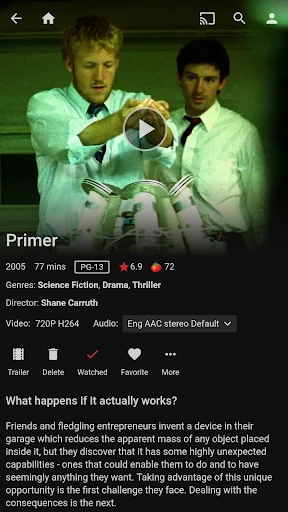


Your Personal Netflix: An Introduction to Jellyfin
Ever found yourself lost in the sea of streaming services, struggling to find the perfect one that caters to all your media needs? Well, let me introduce you to Jellyfin, a powerful and free alternative that might just be the answer to your entertainment prayers.
What Makes Jellyfin Special?
Let’s dive into what makes Jellyfin stand out in the crowded world of media servers. Imagine having a personal Netflix, tailored specifically to your preferences, without any subscription fees. Sounds like a dream, right?
The Power of Open Source
Unlike many other media servers, Jellyfin is completely open source. This means you have the freedom to customize and tweak it to your heart’s content. Whether you’re a tech-savvy tinkerer or someone who just wants a hassle-free setup, Jellyfin has got you covered. Plus, there's a thriving community out there constantly working on improvements and new features, keeping the app fresh and exciting.
Easy to Set Up and Use
Setting up Jellyfin is a breeze. The interface is intuitive and easy to navigate, so you don’t need to be a tech genius to get started. Once you’ve installed it, you can easily organize and stream your media library across different devices. Whether you’re on your Android phone or iOS tablet, your favorite shows and movies are just a tap away.
Packed with Great Features
Jellyfin offers a plethora of features that cater to both casual users and hardcore media enthusiasts. From transcoding to live TV support and DVR capabilities, it’s a powerhouse of a media server. Not to mention, you can stream your content in stunning high definition, ensuring a seamless viewing experience.
Your Data Stays with You
In a world where data privacy is a growing concern, Jellyfin shines with its commitment to user privacy. Since it doesn’t rely on the cloud, all your data stays with you. No more worrying about who might be snooping on your viewing habits!
To sum it up, Jellyfin is a versatile and reliable media server that gives you complete control over your entertainment experience. Whether you’re a seasoned media server user or someone looking to dip their toes into the world of home media servers, Jellyfin offers a unique blend of flexibility, privacy, and performance. So why not give it a shot and see how it transforms your media consumption experience?
Advantages
- Open-source and free to use.
- Supports multiple platforms.
- Customizable user interface.
- Active developer community.
- No ads or tracking.
Disadvantages
- Requires manual setup.
- Limited official support.
- Can be resource-intensive.
- Less polished than competitors.
- No native mobile apps.
Frequently Asked Questions
Q: What platforms does Jellyfin support?
A: Jellyfin is a versatile media server application that supports a wide range of platforms. You can run it on your desktop across Windows, macOS, and Linux. Additionally, it also supports Android and iOS devices, making it convenient to stream your media on-the-go. Its wide platform support ensures that you can access your media library from almost any device you own.
Q: Is Jellyfin free to use?
A: Yes, Jellyfin is completely free to use. It is an open-source media server solution, meaning there are no subscription fees or premium features locked behind a paywall. This makes it an attractive option for users looking for a cost-effective way to manage and stream their media collection. Being free and open-source, it also benefits from community contributions and improvements.
Q: How does Jellyfin handle media privacy and security?
A: Jellyfin prioritizes user privacy and security, as it does not rely on any third-party servers. All your media content and personal information remain on your local server, ensuring that your data is not shared with external entities. Additionally, Jellyfin supports secure connections and user authentication to protect against unauthorized access, making it a reliable choice for privacy-conscious users.
Q: What features does Jellyfin offer for media playback?
A: Jellyfin offers a rich set of features for media playback, including support for a wide variety of video and audio formats. It provides options for subtitles, multiple audio tracks, and transcoding to ensure compatibility with different devices. Additionally, Jellyfin offers streaming enhancements such as Chromecast support, enabling you to cast media directly to your TV for an enhanced viewing experience.
Q: Can I customize the Jellyfin interface?
A: Yes, Jellyfin allows for a high degree of customization to suit your personal preference. Users can customize the interface with different themes and layouts to make the media browsing experience more enjoyable. Moreover, Jellyfin supports plugins and extensions that can add new functionalities and features, allowing you to tailor the application to better meet your specific needs and preferences.
Technical Information
Recommended for You

Credit Sesame: Grow your score

Tzofar - Red Alert | צופר

Magic Diamond Painting-Gem Art

Xbox

Hotmart

Golden Surveys - Make Money

GPS Satellite View: Live Maps

Call Screen & Ringtones Music

Vivint

Notes Launcher: Notepad, To-do

Udemy - Online Courses

Greeting Cards All Occasions

Aetna Health

DAT One

Pixel Studio PRO: editor

Fomz

myAir™ by Resmed

Roaring Tiger Live Wallpaper

CBC News: Breaking & Local

Vivid Seats | Event Tickets

Banfield Pet Hospital

Currency converter offline

Pregnancy Tracker: amma
