
VITA - Video Editor & Maker
Easy Video Editor For Social Media
Screenshots

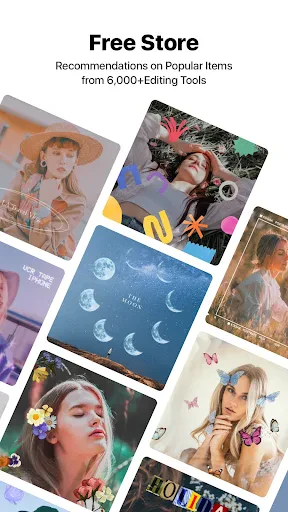


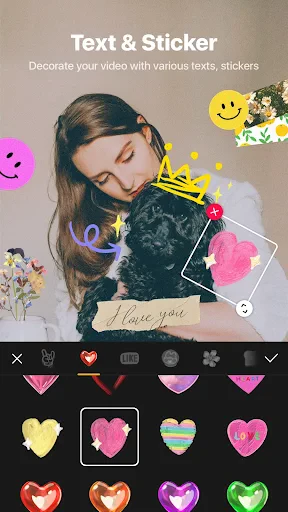
Your Pocket-Sized Video Studio: A Look at VITA
If you've ever found yourself in the creative whirlwind of video editing on your phone, then you've probably stumbled upon a plethora of options. But let me tell you, VITA - Video Editor & Maker is one app that caught my eye and kept me coming back for more. It's like having a mini production studio right in your pocket, and I'm here to spill the beans about it.
An Interface That Just Makes Sense
First things first, the layout of VITA is both modern and super easy to use. You know that feeling of being instantly lost in some apps? Well, you won't get that here. It greets you with a neat and tidy screen where all the tools are right where you think they should be. You won't waste time tapping around endlessly just to find a basic feature. It really turns editing from a boring task into a fun and creative hobby.
A Whole Toolkit of Fun Features
Now, let’s get into the good stuff. VITA is packed with editing tools that let you trim, cut, and split your videos without any hassle. There's also a huge selection of filters and effects that can make your clips look like they're straight out of a movie. And if you love adding music like I do, you'll be thrilled with the massive music library. It's like having your own personal DJ to score your videos!
One tool that's seriously cool is the speed control. Whether you want a epic slow-motion shot or to fast-forward through the action, VITA can do it. On top of that, the app lets you export in high-resolution, so your finished videos stay sharp and look pro, even when you show them on a big TV.
Ready-Made Designs to Get You Started
Sometimes, starting with a blank slate is the hardest part. The good news is VITA has a bunch of pre-made templates to give your creativity a head start. Making a birthday video or a vacation vlog? There's a template that fits. Just choose one, pop in your videos, and see it all come together!
And for those who like to keep up with what's hot, VITA is always adding new templates with the latest looks and trends. That means your videos will always feel new and exciting.
Get Your Videos Out There in a Snap
After you've finished your amazing video, sharing it with everyone is super simple. VITA lets you send your videos straight to apps like Instagram, TikTok, and YouTube. You can even change the export settings to make sure your video is perfectly sized for each platform. No more stress about getting the dimensions or file size wrong!
To wrap it up, VITA - Video Editor & Maker is a real find for anyone wanting to make better videos on their phone. It's more than just an app; it's a creative partner that makes editing fun and satisfying. So, if you're looking to let your creativity run wild, why not try VITA? Go on, give it a shot. You'll be glad you did
Advantages
- Intuitive user interface.
- Wide range of filters and effects.
- High-quality video export options.
- Supports 4K video editing.
- No watermark on free version.
Disadvantages
- Limited music library.
- Occasional app crashes.
- In-app purchases for premium features.
- Large file size.
- Requires high device performance.
Frequently Asked Questions
Q: What features does VITA - Video Editor & Maker offer?
A: VITA offers a wide range of features that cater to both beginners and experienced video editors. Users can enjoy easy-to-use templates, a vast library of music, filters, and effects, as well as the ability to trim, split, and merge clips. Additionally, VITA supports high-quality video exports, making it perfect for content creators aiming for professional results.
Q: Is VITA - Video Editor & Maker free to use?
A: While VITA is free to download and offers many features at no cost, it also includes in-app purchases for premium features. These might include exclusive effects, music tracks, and advanced editing tools. Users can choose to purchase these individually or subscribe for full access, depending on their needs and budget.
Q: Can I use VITA - Video Editor & Maker on both Android and iOS devices?
A: Yes, VITA is available for both Android and iOS platforms. This cross-platform availability ensures that users can switch between devices while maintaining access to their projects. The app is designed to perform optimally on various devices, providing a seamless editing experience regardless of whether you're using a smartphone or a tablet.
Q: How user-friendly is VITA - Video Editor & Maker for beginners?
A: VITA is designed with user-friendliness in mind, making it accessible to beginners and those new to video editing. It offers intuitive navigation, easy-to-follow tutorials, and pre-made templates to guide users through the editing process. This ensures that even first-time editors can create stunning videos without feeling overwhelmed by complex tools.
Q: What are the export options available in VITA - Video Editor & Maker?
A: VITA provides flexible export options that cater to various needs. Users can export videos in different resolutions, including HD, to suit their preferred platforms, whether it’s social media or personal use. The app ensures that the quality of the video is maintained during export, allowing creators to share their work with confidence.
Technical Information
Recommended for You

Conversations (Jabber / XMPP)

ProShot
Easy Voice Recorder

WalletPasses | Passbook Wallet

SmartRent

Compress Video Size Compressor

Great Clips Online Check-in

Circle K

AUTODOC: buy car parts online

SNOW - AI Profile

ConnectNetwork by GTL

Downloader by AFTVnews


Mobile Scanner App - Scan PDF

Tomorrow's Affairs

League of Comic Geeks

Medscape

Brainly: AI Homework Helper

Tarot!

Trainline: Train travel Europe

Node Video - Pro Video Editor

Boost Mobile

TODAY
