
Samsung Smart Switch Mobile
Transfer content to your new Samsung phone
Screenshots
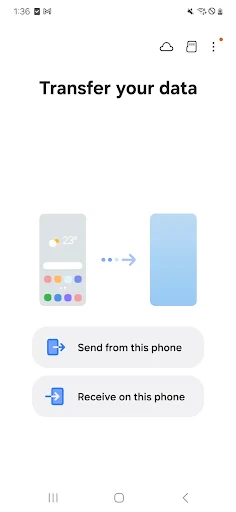
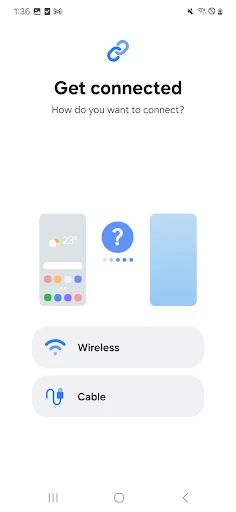
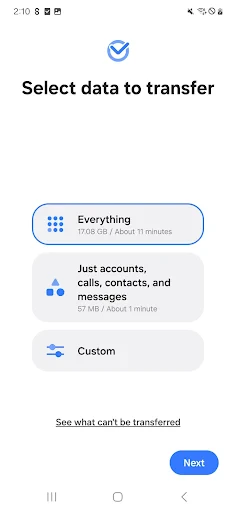
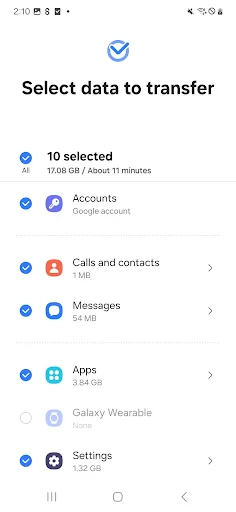
Your New Phone's Best Friend: The Samsung Smart Switch Mobile App
Ever been in that spot where you have a shiny new Samsung phone, but all your important stuff is stuck on your old one? Meet Samsung Smart Switch Mobile – it's like your personal data-moving hero. This clever app is designed to make switching phones super simple, promising a smooth transfer of all your things, and honestly, it's a total game-changer!
Getting Your New Phone Ready with the App
Okay, let's start at the beginning. Getting the app is easy; you can find it on the Google Play Store or the Samsung Galaxy Store. Once it's on your phone, you'll see a simple screen that's really hard to mess up. It's so straightforward, just about anyone can use it without any trouble!
The app works with tons of different phones. It doesn't matter if you're coming from an iPhone, an older Android model, or another Samsung phone; Smart Switch Mobile can handle it. You can move almost everything – your contacts, pictures, songs, texts, and even how your home screen is arranged.
Moving Your Stuff is a Breeze
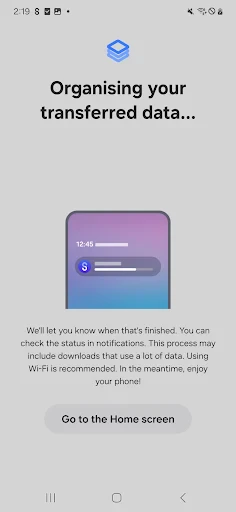
Now, for the main event – actually moving your data. You have a few choices for how to do it. You can use a USB cable, do it wirelessly, or even use a computer. I think the wireless way is the most hassle-free. Just make sure both phones are on the same Wi-Fi, follow the simple on-screen steps, and that's it! Your data gets moved over perfectly.
One thing that really stands out is how quick it is. It's seriously fast; we're talking about moving all your important files in just a few minutes. And the great news? Nothing gets worse in the move. All your photos and videos keep their original quality, and you don't lose anything along the way.
It Works Well and is Easy to Use
Sometimes apps like this don't play nice with different types of phones, but that's not a problem for Smart Switch Mobile. It works smoothly across different systems. I tried it with an old iPhone and a new Samsung Galaxy, and everything moved over without a single issue. It even brought my WhatsApp messages over perfectly, which was a awesome bonus!
As for how it feels to use, Samsung really did a good job. The app is smartly designed, giving you clear directions every step of the way. It feels like you have your own tech expert right there helping you out. Also, the app doesn't bother you with lots of advertisements, which is something everyone can appreciate.
Wrapping It Up
To put it simply, Samsung Smart Switch Mobile is an essential tool for anyone getting a new phone who wants to avoid the headache of moving everything by hand. It's quick, you can count on it, and it's very simple to use. Whether you're not great with technology or you're a total pro, this app will get your new device ready in a flash.
So, if you're making the move to a Samsung phone, you should definitely get Smart Switch Mobile. It takes a job that could be really annoying and makes it completely easy. And let's be honest, who doesn't want things to be a little more convenient?
Advantages
- Easy data transfer between devices
- Supports multiple data types
- User-friendly interface
- Fast transfer speeds
- Compatible with various devices
Disadvantages
- Requires Samsung device for full features
- May not transfer all app data
- Needs stable Wi-Fi or data connection
- Limited support for non-Samsung devices
- Occasional app crashes reported
Frequently Asked Questions
Q: What is Samsung Smart Switch Mobile and how does it work?
A: Samsung Smart Switch Mobile is an app designed to help users transfer data seamlessly from their old device to a new Samsung smartphone. It supports a wide range of data types including contacts, photos, music, and messages. The app can connect devices via USB cable, Wi-Fi, or computer, making it flexible for different user needs.
Q: Is Samsung Smart Switch Mobile compatible with non-Samsung devices?
A: Yes, Samsung Smart Switch Mobile is compatible with various Android devices, not just Samsung. Users can transfer data from any Android device running Android 4.0 or later to a Samsung device. However, the transfer options might be limited compared to Samsung-to-Samsung transfers.
Q: What data can be transferred with Samsung Smart Switch Mobile?
A: Samsung Smart Switch Mobile allows users to transfer a wide array of data including contacts, messages, photos, videos, music, calendar events, and even apps. However, app data transfer may vary depending on the OS and app developer's policies. Users are advised to check compatibility for specific data types.
Q: How secure is the data transfer process with Samsung Smart Switch Mobile?
A: Samsung Smart Switch Mobile ensures a secure data transfer process by using encrypted connections between devices. The app does not store any data on its servers, ensuring that all personal information remains private and secure. Users are encouraged to follow the app's instructions carefully to maintain data integrity during transfer.
Q: Are there any costs associated with using Samsung Smart Switch Mobile?
A: Samsung Smart Switch Mobile is a free application provided by Samsung. There are no hidden costs for downloading or using the app. However, users should be aware that data charges might apply if transferring data over a mobile network, so it's advisable to use a Wi-Fi connection when possible.
Technical Information
Recommended for You

KWGT Kustom Widget Pro Key

PDF Note Reader

MiraManager - File Manager

DeepL Translate

Atlas - Rewards Credit Card

SONIC Drive-In - Order Online

NFC Tools - Pro Edition

Type Machine

Dashtoon: Comics & Manga

미스터블루 - 웹툰, 만화, 소설앱

Google Arts & Culture

Adobe Acrobat Reader: Edit PDF

POLITICO

GRUBL™ 4D Live Wallpapers + AI

Star Walk 2 Plus: Sky Map View

Manga UP!

MTS Urent

Kwikpic - Smart Photo Sharing

Perfect Piano

LumaFusion: Pro Video Editing

GIF Maker, GIF Editor

Zip - Buy Now, Pay Later

Music Player Offline & MP3
