
QuickBend: Conduit Bending
Conduit Bending Guide For Electricians
Screenshots



QuickBend: Conduit Bending
Ever found yourself in a bind trying to figure out the perfect bend for your conduit work? If so, QuickBend: Conduit Bending might just be the app you didn’t know you needed. I recently had the chance to dive deep into this nifty little tool available on both Android and iOS, and here’s what I found out.
A First Look at the App
First off, let’s talk about the user interface. QuickBend has a sleek and intuitive design that makes it super easy for anyone to jump right into the action. Whether you’re a seasoned electrician or a newbie just getting started, the app’s layout is straightforward, and you won’t find yourself fumbling around trying to figure out where everything is. I was pleasantly surprised by how little time it took me to get the hang of things.
The Handy Tools Inside
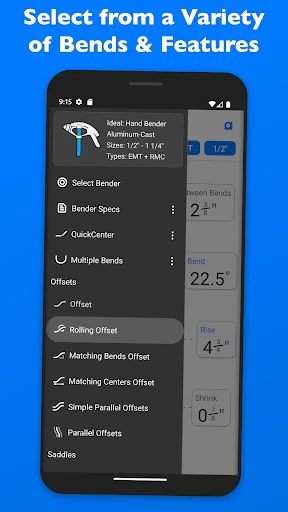
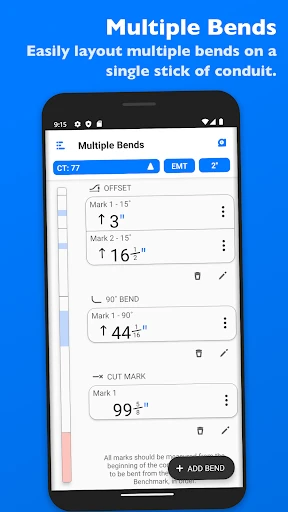
One of the standout features of QuickBend is its precision. The app allows you to calculate bends with an accuracy that’s hard to find in other tools. You can choose from various types of bends, like offsets, saddles, or even custom bends, and the app guides you step by step. This is especially useful when you’re on-site and need to make quick decisions without second-guessing yourself.
Another feature I absolutely loved is the material selection. QuickBend lets you select the type of conduit you’re working with, whether it’s EMT, IMC, or PVC, and adjusts the calculations accordingly. This little touch ensures that your bending is spot on, regardless of the material.
Putting It to Work on the Job
Now, you might wonder, “Is this app really going to make a difference in my daily work?” The short answer is: absolutely. I tried it out on a recent project, and the time I saved was remarkable. Instead of manually calculating each bend and worrying about potential errors, I simply input the measurements, and QuickBend did the rest. It felt like having a personal assistant dedicated to conduit bending right in my pocket.
QuickBend also has a neat history feature that keeps a record of your most recent projects. This means if you’re doing repeat work or need to refer back to previous jobs, you can easily access your past calculations. It’s these small details that make the app not just a tool, but a game-changer in the fieldwork.
The Bottom Line
Overall, QuickBend: Conduit Bending is a must-have for anyone involved in electrical installations and conduit bending. It’s not just about making the job easier; it’s about enhancing accuracy and efficiency. With its user-friendly interface and comprehensive features, QuickBend stands out as a valuable asset for professionals.
Sure, there are other apps out there, but the precision and ease of use that QuickBend offers are unparalleled. If you’re in the market for a tool that simplifies your work and boosts your productivity, give QuickBend a try. Trust me, you’ll wonder how you ever got by without it
Advantages
- User-friendly interface for beginners
- Comprehensive conduit bending guides
- Supports multiple pipe types
- Accurate angle calculations
- Offline functionality available
Disadvantages
- Limited advanced features
- Occasional calculation errors
- No integration with CAD tools
- Ads in free version
- No tutorial for complex bends
Frequently Asked Questions
Q: What is QuickBend: Conduit Bending used for?
A: QuickBend: Conduit Bending is a specialized app designed for electricians and contractors. It helps users calculate precise conduit bending measurements. This is essential for installing electrical conduits accurately, ensuring compliance with industry standards, and reducing material waste. With its easy-to-use interface, the app streamlines the process of planning and executing conduit bends, saving both time and resources.
Q: Is QuickBend available for both Android and iOS devices?
A: Yes, QuickBend: Conduit Bending is available for download on both Android and iOS platforms. Users can find it on the Google Play Store for Android devices and the Apple App Store for iOS devices. The app offers the same set of features across both platforms, ensuring a consistent user experience regardless of the device being used.
Q: Does QuickBend require an internet connection to function?
A: No, QuickBend: Conduit Bending does not require an internet connection to function. The app is designed to work offline, making it highly convenient for use in locations where internet access is limited or unavailable. Users can perform all necessary calculations and access stored data without needing to be connected to the internet.
Q: What features does QuickBend offer to improve conduit bending accuracy?
A: QuickBend provides a range of features to enhance accuracy in conduit bending. It includes calculators for different bend types, such as offsets, saddles, and 90-degree bends. The app also offers customization options for bend radius and conduit size, along with a material cost estimator. These tools help ensure precise measurements and efficient planning, significantly reducing errors and material wastage.
Q: Is there a tutorial or support available for new users of QuickBend?
A: Yes, QuickBend: Conduit Bending offers a comprehensive tutorial for new users, guiding them through the app’s features and functionalities. Additionally, the app provides customer support for troubleshooting and inquiries. Users can access these resources within the app or through the developer’s website, ensuring a smooth and user-friendly experience.
Technical Information
Recommended for You

HomeSearchNOW

NewsNation: Unbiased News

ConnectEBT

Chatbot AI - Search Assistant

3D Live Wallpapers 4D video 4K

1Weather Forecasts & Radar

Speedometer - Odometer App

Booksy Biz: For Businesses

Microsoft Translator

MediBang Paint:Draw Art, Comic

Game Booster Fire GFX- Fix Lag

MBTA mTicket

Afterpay: Pay over time

MyChoice Benefits

Second Number for Call & Text

Find My Phone: Phone Locator

VIZ Manga

Security Craft Mod Minecraft

LinkedIn Learning

Jakdojade: public transport

Prepware Powerplant

IP Camera Viewer

Pinkfong Shapes & Colors
