
Google Keep - Notes and lists
Quick notes and lists for busy people
Screenshots


Discovering the Simplicity of Google Keep
Hey there, fellow note-takers and list-makers! I recently took Google Keep for a spin, and let me tell you, it's like finding that perfect pen you've been searching for. This app, available on both Android and iOS, is your trusty sidekick in the world of digital notes and lists. Whether you're jotting down a grocery list, capturing a brilliant idea that strikes in the middle of the night, or organizing your life's chaos, Google Keep is here to help.
A Dream for Minimalists
Opening Google Keep for the first time feels like stepping into a minimalist's dream. The interface is clean and intuitive, which means you spend less time figuring out how to use the app and more time actually using it. It's like a breath of fresh air in a world cluttered with overly complicated apps. The design is straightforward, with notes displayed as sticky notes on your screen, each one ready to be picked up and written on.
Handy Tools You'll Love
Now, let's chat about the features that make Google Keep stand out. One of my favorite things is the ability to color-code your notes. It's a small touch, but it makes a huge difference in how you organize your thoughts. Need to remember to buy milk? Make it a bright yellow note so it catches your eye. Want to keep track of your work tasks? Maybe a cool blue will do the trick.
Another nifty feature is the ability to set reminders. I've lost count of how many times I've forgotten important tasks, but with Google Keep, you can set time-based or location-based reminders. It's like having a personal assistant who never forgets!
And for those of you who love sharing ideas with friends or family, Google Keep allows you to collaborate on notes. Whether it's planning a group trip or working on a project, you can invite others to view and edit your notes. It's collaboration made easy.
Effortless and Intuitive to Use
One of the things I appreciate most about Google Keep is its simplicity. You don't need a manual to get started; everything is right where you'd expect it to be. Creating notes is a breeze, and you can even add images and drawings if you're feeling creative. The voice memo feature is a lifesaver when you're on the go and need to capture a thought quickly.
The search function deserves a mention too. It's incredibly efficient, helping you find exactly what you're looking for in seconds. No more endless scrolling through your notes trying to find that one elusive piece of information.
A Couple of Things to Keep in Mind
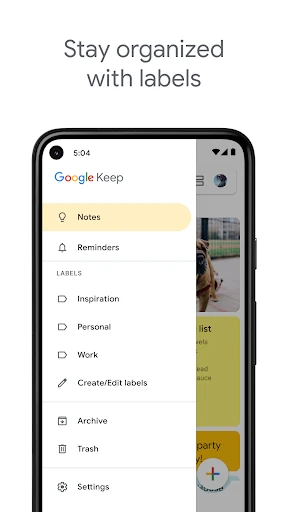
While Google Keep is pretty fantastic, it's not without its quirks. For those of you who love deep organization, you might find the lack of folders a bit limiting. Google Keep opts for labels instead, which can take some getting used to. However, I found that once I adapted to this system, it worked quite well.
Another thing to note is that while Google Keep is great for quick notes and lists, it might not be the best choice for more detailed note-taking. If you're looking for a full-fledged note-taking app with advanced text formatting, you might need to look elsewhere.
Is It the Right App for You?
In the end, Google Keep is a solid choice for anyone looking to simplify their note-taking and list-making process. It's user-friendly, packed with features, and integrates seamlessly with Google's ecosystem. Whether you're a student, professional, or just someone who loves staying organized, Google Keep is worth trying out.
So, next time you find yourself buried under a pile of sticky notes, give Google Keep a try. It's like having an organized friend in your pocket, always ready to help you keep track of your thoughts and tasks. Happy note-taking!
Advantages
- Seamless sync across devices
- User-friendly interface
- Collaborative features
- Voice notes capability
- Free and ad-free
Disadvantages
- Limited formatting options
- No rich text support
- Lacks advanced organization
- No offline access
- Limited integration with other apps
Frequently Asked Questions
Q: What features does Google Keep offer for note-taking?
A: Google Keep is a versatile note-taking app that allows users to create notes, lists, and reminders. It offers features such as color-coding, labeling, and the ability to add images and audio recordings. With Google Keep, you can also collaborate with others in real-time, making it a great tool for both personal and team projects.
Q: Is Google Keep available for offline use?
A: Yes, Google Keep can be used offline. You can view and edit your notes even without an internet connection. Any changes made while offline will automatically sync with your account once you are connected to the internet again. This makes Google Keep a reliable choice for note-taking on the go, without worrying about connectivity issues.
Q: How secure is my data in Google Keep?
A: Google Keep takes data security seriously. Your notes are stored securely in Google's data centers, and the app uses encryption to protect your information both in transit and at rest. However, it's always a good idea to use a strong password for your Google account and enable two-factor authentication to enhance security.
Q: Can I integrate Google Keep with other Google services?
A: Yes, Google Keep integrates seamlessly with other Google services. You can easily access your notes from Google Docs, Google Calendar, and Gmail. This integration allows for a smooth workflow, as you can attach notes to calendar events or convert Keep notes into Google Docs for further editing or sharing.
Q: Does Google Keep support voice commands?
A: Google Keep supports voice commands, allowing you to create notes and lists hands-free. By using Google Assistant, you can add new notes, set reminders, and even search through your existing notes using voice commands. This feature is especially useful for those who prefer dictation over typing, enhancing accessibility and convenience.
Technical Information
Recommended for You

CloudLibrary

Vimu Media Player for TV

PREMIER Credit Card

YTV Player Pro

DeepL Translate

Files by Google

Clean Buddy - Antivirus

MP3 Converter - Video to MP3

All HD Video Player-All Format

GPS Navigation Live Map Road

Audiomack: Music Downloader

Digital Compass for Android

QuikTrip: Food, Coupons & Fuel

AI QR Code Scanner & Generator

Football Wallpaper HD 4K

Satellite Map Live Earth View

بلد - مسیریاب، نقشه - Balad

Bible Chat: Holy Bible Study

Skype for Business for Android

Camsea - Live Video Call

Podcast Go

Telemundo 47: Noticias de NY

PDF Reader Point
