
PhotoPills
PhotoPills helps photographers perfectly plan and capture shots
Screenshots

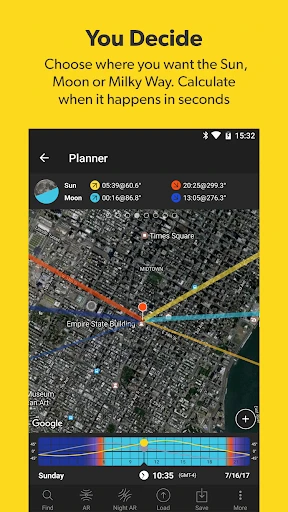

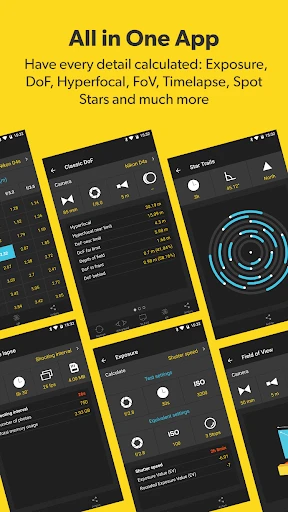

If you're anything like me, always on the hunt for that perfect shot, then PhotoPills is a name that probably rings a bell. This app, available on both Android and iOS, is like a Swiss Army knife for photographers, offering a suite of tools that are designed to help you plan and capture stunning photos. But let's dive a little deeper and see what this app is all about.
Your All-in-One Photo Planning Buddy
PhotoPills is not just another photo editing app; it's a comprehensive toolkit that assists you in planning your photography down to the smallest detail. Whether you're into landscape photography, astrophotography, or just love capturing the golden hour, PhotoPills has got you covered. One of the standout features is the Planner, which allows you to visualize the position of the sun, moon, and Milky Way at any given time and place. It's like having a personal celestial guide right in your pocket!
The Cool Tools You Get to Play With
The app is packed with features, each more intriguing than the last. It includes a Sun and Moon calculator that helps you track the golden and blue hours, perfect for those enchanting sunrise or sunset shots. There's also a depth of field (DoF) calculator, which is a godsend for portrait photographers looking to nail that perfect bokeh effect. And let's not forget the exposure calculator, which takes the guesswork out of long exposure shots. Honestly, it feels like you have a mini photography school at your fingertips.
Getting Comfortable with the App
Now, I won't sugarcoat it; PhotoPills has a bit of a learning curve. The interface is jam-packed with information and can be a tad overwhelming at first. But, once you get the hang of it, it becomes an indispensable tool in your photography arsenal. The app provides a plethora of tutorials and an active community forum, which are incredibly helpful for beginners. So, if you're willing to spend a little time learning, the rewards are well worth it.
The Real Deal on Its Value
Yes, PhotoPills isn't free, and that might be a sticking point for some. However, think of it as an investment in your craft. The app's ability to help you pre-visualize your shots, plan meticulously, and execute flawlessly is priceless, especially when you're chasing that once-in-a-lifetime shot. Plus, the developers frequently update the app, ensuring it stays ahead of the curve with new features and improvements.
In conclusion, PhotoPills is a must-have for any serious photographer. It's not just an app; it's a gateway to precision, creativity, and innovation in photography. So, if you're ready to take your photography to the next level, give PhotoPills a try. It might just be the best decision you make for your photographic journey.
Advantages
- User-friendly interface for quick navigation
- Comprehensive planning tools for photographers
- Supports augmented reality for shot visualization
- Detailed tutorials and community support
- Customizable settings for personalized use
Disadvantages
- Steep learning curve for beginners
- Limited free features; requires purchase
- Occasional bugs in AR mode
- Battery drain due to high resource usage
- No offline map availability
Frequently Asked Questions
Q: What is PhotoPills and what can it do for me?
A: PhotoPills is a versatile photography app designed for both amateur and professional photographers. It offers a wide array of tools that help users plan, shoot, and edit their photos. With features like sun and moon tracking, augmented reality views, and exposure calculators, it helps photographers capture the perfect shot by planning every detail in advance.
Q: Is PhotoPills suitable for beginners in photography?
A: Yes, PhotoPills is suitable for photographers of all skill levels. While it offers advanced features that professionals will appreciate, it also provides detailed tutorials and a user-friendly interface that beginners will find helpful. The app is designed to grow with you as you develop your skills, making it a valuable tool for continuous learning.
Q: What platforms is PhotoPills available on?
A: PhotoPills is available for both Android and iOS devices. This cross-platform availability ensures that users can access its powerful tools on most smartphones and tablets. You can download it from the Google Play Store for Android devices or the Apple App Store for iOS devices, making it easy to integrate into your photography workflow.
Q: Does PhotoPills require an internet connection to work?
A: PhotoPills does not require a constant internet connection to function, which is great for photographers who often work in remote locations. Most of its features, such as the planner, calculators, and augmented reality, work offline. However, downloading the app and accessing some tutorials or updates may require internet access.
Q: Are there any ongoing costs associated with using PhotoPills?
A: PhotoPills requires a one-time purchase fee to download and use the app. There are no subscription fees or hidden costs associated with its core features. Once purchased, users receive free updates, ensuring they always have access to the latest tools and improvements without any additional charges.
Technical Information
Recommended for You

Photo Recovery & File Restore

Elevate - Brain Training Games

Offline Map Navigation

Audiobooks.com: Books & More

OneFootball: All Soccer Scores

Mileage Tracker by Everlance

ViX: TV, Deportes y Noticias

Family Tracker by Phone Number

Telemundo 47: Noticias de NY

Live football TV

DMSS

AI Video Generator - Clips AI

ZoZo Player - URL Video Player

Map Drive - Radar, Speedometer

ThemePro - Widget & Wallpaper

Adoraboo - Raise Boos Together

SoundHound - Music Discovery

TimeTree - Shared Calendar

Color by Letter: Sewing game

Weather Live - Radar & Widget

Magic Wallpaper: Broken Screen

GOAT – Sneakers & Apparel

KAYAK: Flights, Hotels & Cars
