
Polycam: 3D Scanner & Editor
Capture Reality Create Models For Everyone
Screenshots
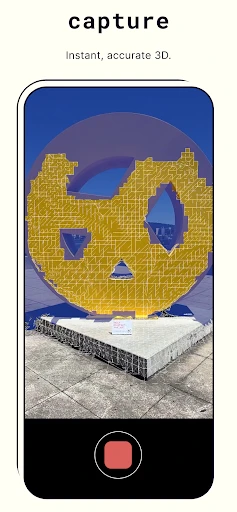
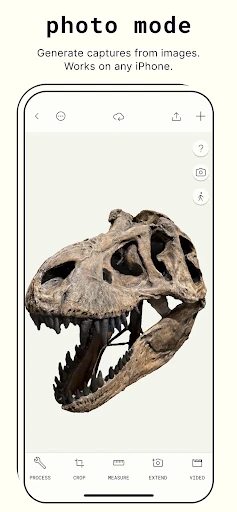
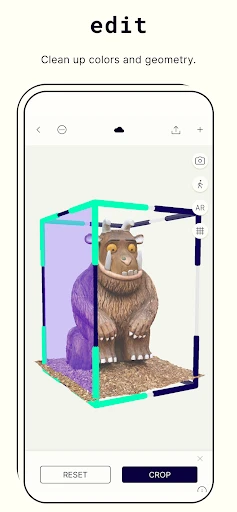
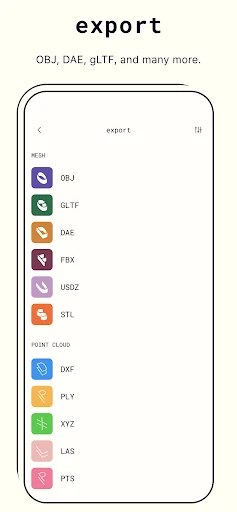
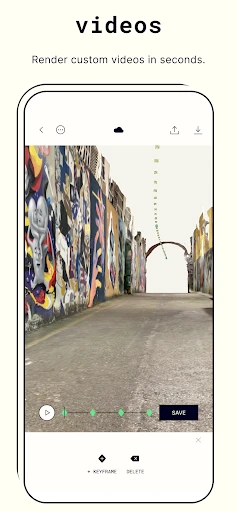
Turn Your Smartphone into a Pocket 3D Scanner with Polycam
Ever thought about transforming your smartphone into a pocket-sized 3D scanner? That's exactly what Polycam: 3D Scanner & Editor offers, and let me tell you, it's quite the game-changer. This nifty app brings 3D scanning right to your fingertips, making it accessible for everyone from hobbyists to professionals.
Getting the App on Your Phone
First things first, installation is a breeze. Whether you're on Android or iOS, just head over to your app store, and you’ll have Polycam: 3D Scanner & Editor ready to go in no time. The setup is straightforward, and the app guides you through the initial steps with a friendly tutorial.
How to Capture Objects in 3D
Once you're set up, the real fun begins. Polycam allows you to capture high-quality 3D models using your device's camera. The process is surprisingly intuitive. Just point, shoot, and let the app work its magic. It uses photogrammetry, which is a fancy way of saying it stitches together photos to create a 3D model.
And the results? Pretty impressive! The details captured are sharp, making it perfect for creating digital replicas of objects. Whether you’re scanning for fun or for a project, this app delivers.
Fixing Up Your 3D Creations
But wait, there's more! Not only can you scan, but you can also edit your models directly within the app. The editing tools are robust yet easy to use. You can trim, refine, and even add textures to your models. It's like having a mini 3D studio in your pocket.
For those who are more tech-savvy, Polycam also allows you to export your models in various formats, making it compatible with other 3D software. This feature is particularly useful for designers and engineers who might want to integrate their scans into larger projects.
What Makes This App Special
Here’s the kicker: the app's versatility. Whether you're a student, a designer, or just someone who loves tech, Polycam has something for you. It's intuitive enough for beginners yet packed with features that professionals appreciate. Plus, it’s always updating, adding new features and improving performance.
Another highlight is the community aspect. You can share your creations with other users and browse through their works, sparking inspiration and collaboration. It’s a vibrant space where creativity thrives.
So, if you're looking to dive into the world of 3D scanning and editing, give Polycam a try. It's not just an app; it's a tool that opens up a new dimension of possibilities. Whether for work or play, Polycam: 3D Scanner & Editor is a solid choice that won't disappoint.
Advantages
- High-quality 3D scans with accurate details.
- User-friendly interface for easy navigation.
- Works offline after initial setup.
- Supports multiple export formats.
- Regular updates with new features.
Disadvantages
- Requires a device with LiDAR for best results.
- Limited free version capabilities.
- Consumes significant battery during use.
- Large app size may require storage management.
- Occasional crashes on older devices.
Frequently Asked Questions
Q: What is Polycam: 3D Scanner & Editor used for?
A: Polycam: 3D Scanner & Editor is a versatile application designed to transform your mobile device into a powerful 3D scanner. It allows users to capture high-quality 3D models of objects and spaces using their device's camera. The app is perfect for architects, designers, and hobbyists who need accurate 3D scans for various purposes, including design, visualization, and sharing.
Q: Is Polycam compatible with all devices?
A: Polycam: 3D Scanner & Editor is compatible with both Android and iOS platforms. However, the performance and available features might vary depending on the device's hardware capabilities. For optimal performance, it is recommended to use devices with LIDAR sensors, such as the latest models of iPhones and iPads, which provide enhanced scanning accuracy and detail.
Q: How accurate are the 3D scans produced by Polycam?
A: The accuracy of 3D scans generated by Polycam largely depends on the device used and the scanning conditions. Devices equipped with LIDAR technology offer the highest level of accuracy, capturing intricate details and complex geometries. However, even on devices without LIDAR, Polycam utilizes advanced algorithms to produce impressive scans, though some fine details may be less defined.
Q: Can I edit the 3D models within the app?
A: Yes, Polycam comes with built-in editing tools that allow you to refine and modify your 3D models directly within the app. Users can crop, resize, and adjust the models to fit their specific needs. The app also supports exporting the models to various formats, making it easy to integrate them into other design software or share them with others.
Q: Is there a cost associated with using Polycam?
A: Polycam offers both free and paid versions. The free version provides basic scanning and editing functionalities, enough for casual users. However, unlocking advanced features, such as higher resolution exports and additional editing tools, requires a subscription or one-time purchase. This pricing model allows users to choose the level of functionality that best suits their needs.
Technical Information
Recommended for You

AirPlay

Ting Sensor

Princess Cruises

Legacy Academy – Learn Success

Swiggy: Food Instamart Dineout

HaloVPN Pro: Fast VPN Proxy

Replit

CryptoWatch

McDonald's Offers and Delivery

Triller: Social Video Platform

GPS Maps Voice Navigation App

Time Warp Scan - Face Scan

Prank Call - Fake Call Video

Mobile Scanner App - Scan PDF

Gaia GPS: Offline Trail Maps

Facetune: Hair, Photo Editor

Coursera: Grow your career

ConnectNetwork by GTL

Monkey - random video chat

Phone Cleaner - AI Cleaner

Living Worlds – Mark Ferrari

TickPick - Live Event Tickets

Talkatone: Texting & Calling
