
Audyssey MultEQ Editor app
Calibrate Your Home Theater Audio
Screenshots
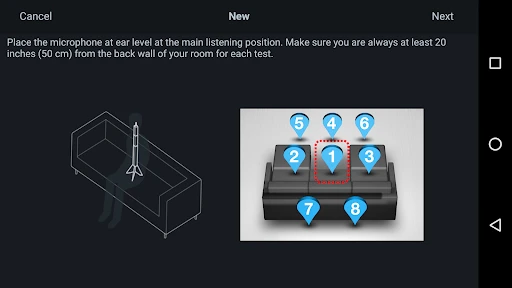
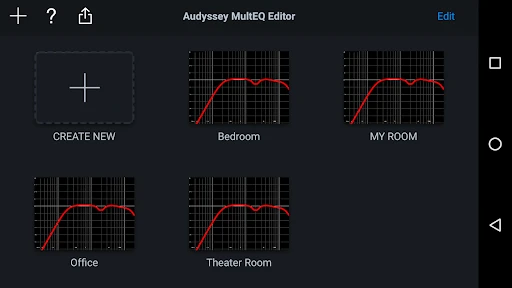
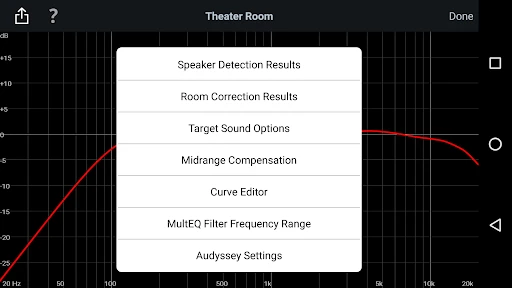
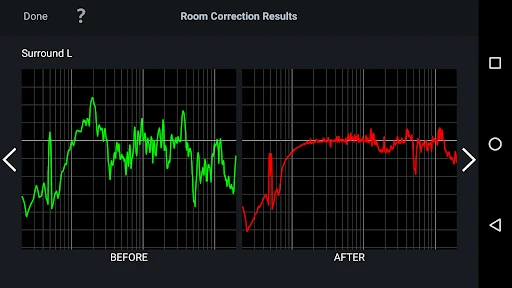
Your Pocket Sound Engineer: The Audyssey MultEQ Editor App
Have you ever wished you could have the skills of a professional sound engineer right on your phone? The Audyssey MultEQ Editor app might be the perfect tool you've been looking for. Whether you're a serious audiophile or just someone who loves getting their home theater sound just right, this app could become your new favorite gadget.
A Closer Look at What It Does
First things first, this isn't a basic sound adjustment tool. The Audyssey MultEQ Editor app is built to connect with your home theater receiver, letting you fine-tune your audio in ways you couldn't before. It works with a range of Denon and Marantz receivers, making it a flexible option for many home audio systems.
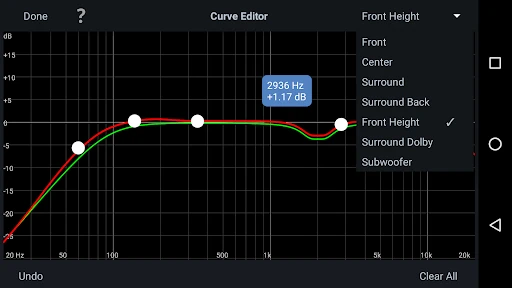
The app lets you see the results from your MultEQ calibration, so you can understand exactly how your system is performing. You can check out the before-and-after results from the Audyssey calibration, which is really neat for seeing the effect of your changes. It also lets you make your own custom adjustments to the sound curve to match what you like to hear. Who doesn't love making things their own?
Taking Control of Your Audio
One of the best features is the power to adjust the EQ frequency range. This lets you carefully shape your sound profile, tweaking the frequency for each individual speaker in your setup. For the more technically minded, you can even choose to turn off the MultEQ filters for specific speakers. This puts you in the driver's seat for your entire audio environment.
On top of that, the app shows you detailed graphs that help you see the acoustics of your room. It's like having a tiny professional studio in the palm of your hand. And if you love comparing data, you can switch between different MultEQ settings like Audyssey Flat and Audyssey Reference to find the best match for your system.
How Easy Is It to Use?
Now, let's talk about how user-friendly it is. To be honest, it does take a little time to learn. If you're new to adjusting audio settings, it might seem a bit complicated at the start. But once you get familiar with it, the layout is actually pretty straightforward. The app is organized so you can move through the various settings without feeling confused.
One important point is that the app isn't free. There's a one-time purchase price, which could be a downside if you're watching your spending. However, for the amount of personalization and command it gives you, it's probably a worthwhile investment for anyone who is passionate about their audio quality.
Wrapping It Up
So, should you get the Audyssey MultEQ Editor app? If you're the kind of person who loves getting into the details of sound customization, then definitely. It offers a degree of control and accuracy that's tough to find elsewhere. It might not be for everyone, especially if you prefer a simple setup that works right out of the box, but for those wanting to elevate their home theater experience, it's a real game-changer.
In the end, the app provides a powerful set of features that help you get the best performance from your audio system. With its in-depth calibration choices and easy-to-navigate design, it's an essential tool for anyone who is serious about their sound. Why not check it out and see what your home audio system can really do?
Advantages
- Advanced audio tuning capabilities
- Customizable sound profiles
- Intuitive user interface
- Real-time audio adjustments
- Compatible with multiple devices
Disadvantages
- Requires compatible hardware
- Steep learning curve for beginners
- Limited free features
- Occasional bugs reported
- Expensive compared to competitors
Frequently Asked Questions
Q: What is the Audyssey MultEQ Editor app used for?
A: The Audyssey MultEQ Editor app is designed to help users optimize their audio system's performance. It allows for custom calibration of home theater systems by providing tools to adjust sound settings, fine-tune audio parameters, and personalize the listening experience. This app is essential for audiophiles looking to enhance audio quality and tailor soundscapes to individual preferences.
Q: Is the Audyssey MultEQ Editor app compatible with all audio systems?
A: No, the Audyssey MultEQ Editor app is not universally compatible with all audio systems. It is specifically designed to work with certain AV receivers and audio processors that support Audyssey technology. Before purchasing, users should verify compatibility with their specific audio equipment to ensure the app can be utilized effectively for sound calibration.
Q: How user-friendly is the Audyssey MultEQ Editor app for beginners?
A: While the Audyssey MultEQ Editor app offers extensive features for advanced users, it may present a learning curve for beginners. The interface includes detailed settings and technical jargon that can be challenging for those unfamiliar with audio calibration. However, comprehensive guides and online resources are available to help new users navigate the app's functionalities.
Q: What are the main benefits of using the Audyssey MultEQ Editor app?
A: The main benefits of using the Audyssey MultEQ Editor app include enhanced audio customization, precise sound calibration, and improved overall sound quality. Users can adjust various audio parameters to suit their room's acoustics and personal preferences, resulting in a more immersive and satisfying listening experience that standard factory settings cannot provide.
Q: Are there any additional costs associated with the Audyssey MultEQ Editor app?
A: Yes, there is an initial purchase cost for the Audyssey MultEQ Editor app, which users must consider. Additionally, while the app itself does not require subscriptions, users might incur costs related to compatible hardware or additional calibration equipment to fully utilize the app's features. Checking for any updates or premium features is also advisable.
Technical Information
Recommended for You

Homework Helper & Math Solver

WWMT News 3

Free Stuff

Soccer Ronaldo wallpapers CR7

inKind

Pydroid 3 - IDE for Python 3

NBC LA: News, Weather

Cool Ringtones 2025

ERG for Android

SeatGeek – Tickets to Events

Print Photo - Print to Size

SAP Concur

Hue Light App Remote Control

Square Team

Tether: Local Match Dating

Coinbase Wallet: NFTs & Crypto

IEEE

Apple Watch for Android

Venmo

FamilyAlbum - Photo Sharing

Tagged - Meet, Chat & Dating

Kiddopia - Kids Learning Games

Apartments & Rentals - Zillow
