
Pain Tracker & Diary
Pain journal for chronic condition patient tracking
Screenshots


My Experience with the Pain Tracker & Diary App
If you've ever struggled with chronic pain, you know how important it is to keep track of your symptoms and triggers. That's where the Pain Tracker & Diary app comes in. As someone who has tried a fair share of pain management tools, I was curious to see how this app would stack up. Here's my take on it.
First Impressions and Setup
First things first, installing the Pain Tracker & Diary app is a breeze. It's available on both Android and iOS, so no worries about compatibility. Once you open the app, you see a simple and easy-to-understand layout. You really don't need to be good with technology to find your way around. The app walks you through creating your profile, which involves listing your common pain spots, what usually sets it off, and even the medicines you take. It's like having a personal journal that pays attention and remembers all the details for you.
How to Log Your Discomfort
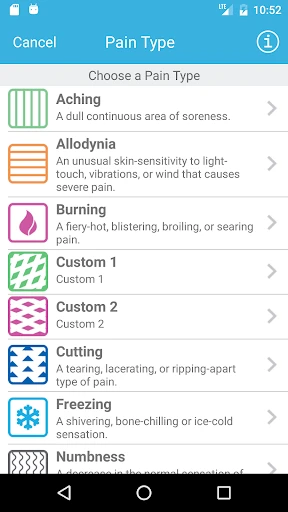
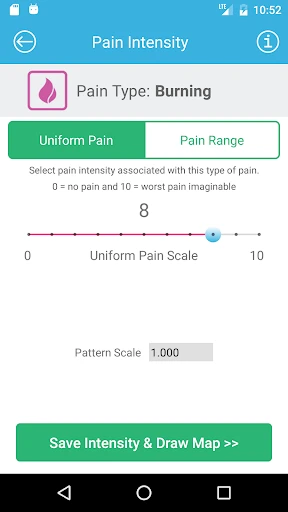
What makes this app special is how detailed it is for tracking. You can record your pain level, where it hurts, and how long it lasts at any time. You can also jot down notes about what you were doing when the pain began or if anything specific seemed to cause it. This is super helpful because, let's be honest, when you're hurting, remembering small details is really tough. The app can also send you reminders to make an entry, which helps you keep a steady log.
Making Sense of Your Records
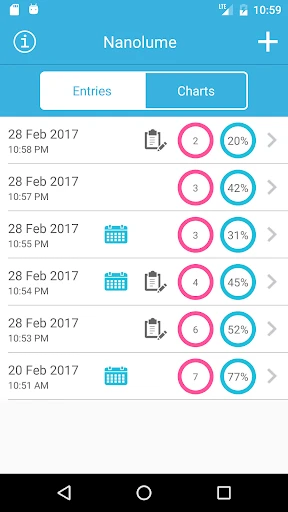
After you've been logging your pain for a couple of weeks, the app really shows its value with its analysis tools. It creates detailed reports that point out patterns in your pain episodes. For example, you might find out that your headaches in the afternoon happen on days you miss lunch, or that your back feels worse after you exercise. These discoveries can be extremely helpful when you're talking about care plans with your doctor.
Other Handy Tools and Considerations
Besides tracking pain, the app includes meditation sessions and relaxation methods designed to help you handle pain without medication. I thought the guided meditations were especially soothing during bad pain days. Another neat feature is that it can connect with wearable gadgets. If you love technology, linking your smartwatch or fitness band can give you even more information, like your heart rate or how active you've been, which helps paint a fuller picture of your health.
One thing I liked was the app's focus on keeping your information private. All your data is kept safe, and you decide what details you want to share with your doctors.
Wrapping Up My Review
To sum it up, the Pain Tracker & Diary app is a great tool for anyone living with ongoing pain. It's easy to use, tracks everything thoroughly, and gives you smart analysis, making it a really useful part of managing pain. Whether you're trying to spot trends or just want a dependable way to record how you're feeling, this app does the job well. It might not take the place of a doctor's advice, but it definitely supports it by giving a clear and detailed story of your pain.
If you're sick of writing notes on scraps of paper or using general apps that aren't made for pain, you should test out the Pain Tracker & Diary. It could be the helpful partner you need while working towards feeling better.
Advantages
- User-friendly interface for easy navigation
- Customizable pain tracking features
- Detailed reports for health professionals
- Supports photos and voice notes
- Secure data with passcode protection
Disadvantages
- Limited free version features
- Occasional sync issues
- No integration with wearable devices
- Requires regular updates for accuracy
- Customer support response time can be slow
Frequently Asked Questions
Q: What is the main purpose of the Pain Tracker & Diary app?
A: The Pain Tracker & Diary app is designed to help users document and monitor their pain levels and symptoms over time. It allows users to record details such as pain intensity, location, and triggers, and offers insights through charts and reports. This app is particularly useful for individuals managing chronic pain conditions, as it aids in communicating effectively with healthcare providers.
Q: How can I benefit from using the Pain Tracker & Diary app?
A: By regularly using the Pain Tracker & Diary app, users can gain a better understanding of their pain patterns and potential triggers. The app's detailed logs and reports can help users identify trends and correlations, leading to more informed discussions with healthcare professionals. This can result in improved treatment plans and pain management strategies tailored to the user's specific needs.
Q: Is the Pain Tracker & Diary app user-friendly for beginners?
A: Yes, the Pain Tracker & Diary app is designed with an intuitive interface that makes it easy for beginners to navigate. The app provides step-by-step guidance on how to log pain episodes and customize tracking settings. Additionally, it offers features such as reminders and alerts to ensure consistent tracking, making it accessible for users of all ages and tech skill levels.
Q: Can I share my pain tracking data with my healthcare provider?
A: Absolutely! The Pain Tracker & Diary app includes features that allow users to export their data into easily shareable formats, such as PDFs or CSV files. This functionality enables users to provide comprehensive pain history to their healthcare providers, facilitating more effective medical consultations and enabling personalized treatment adjustments based on detailed pain tracking records.
Q: Does the Pain Tracker & Diary app offer any customization options?
A: Yes, the Pain Tracker & Diary app offers several customization options to suit individual needs. Users can personalize their tracking experience by selecting specific pain types, locations, and triggers to monitor. Additionally, the app allows users to set custom reminders for logging entries and offers various visualization options to view pain data in ways that are most meaningful to them.
Technical Information
Recommended for You

Live Earth Map & GPS Map

T-Mobile® FamilyMode™

Chat Online: Talkie Live

Fotorama - AI Photo Generator

NewsON - Local News & Weather

Wanderlog - Trip Planner App

Planity

Prepware General

Pocket Casts - Podcast App

Outback Steakhouse

All Video Downloader Master

PDG PROmote 2023-2025

VR Player Pro - Video Player

Bolt Driver: Drive & Earn

Google Play Games

My Bible - Verse+Audio

Healofy Pregnancy & Parenting

Clap to Find My Phone

MyHyundai with Bluelink

Musicify-Offline MP3 Player

365Scores: Live Scores & News

AR Drawing: Paint & Sketch App

Color Pop - Fun Coloring Games
