
Kasa Smart
Control Home Devices From Anywhere
Screenshots
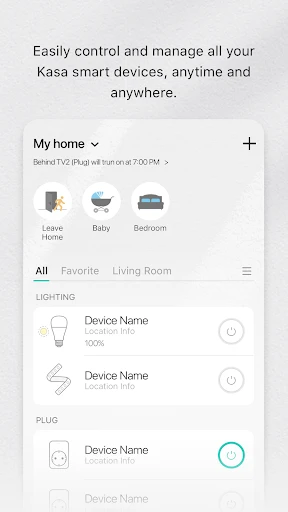
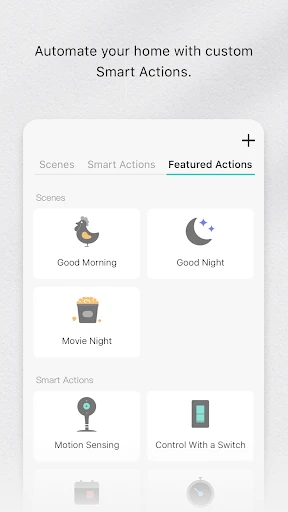
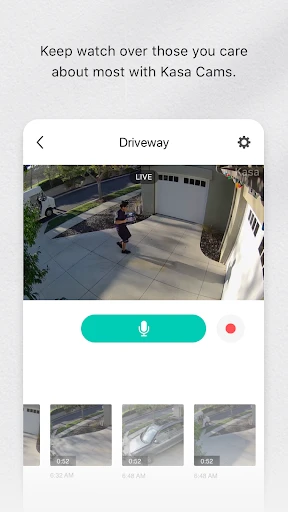

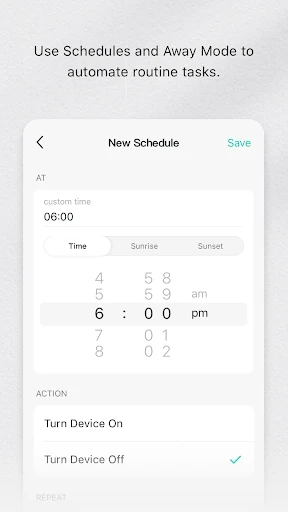
Transforming Your Home with Kasa Smart
Hey there, tech enthusiasts! Ever thought about turning your regular home into a smart one without spending a fortune? Let me introduce you to Kasa Smart, a cool app that's become a real game-changer in the world of smart home gadgets. If you're like me and love the idea of managing your home from your phone, then let's check out why Kasa Smart is an essential tool for your connected life.
So, What Exactly is Kasa Smart?
Kasa Smart is an app created by TP-Link, and its main goal is to put convenience right in the palm of your hand. Picture being able to manage your lights, power outlets, cameras, and other smart gadgets from anywhere on the planet. Sounds pretty amazing, doesn't it? Whether you're relaxing on your sofa or on a trip abroad, Kasa Smart lets you adjust your home's settings without any hassle.
Getting started with the app is really simple. Even if you're not super tech-savvy, you'll find the setup process to be quick and easy. All that's required is a good Wi-Fi connection, and you're all set. The app's design is also very user-friendly, so you won't need to waste time learning how to use it. I've tried it myself, and Kasa Smart really does make everything straightforward.
Handy Features That Simplify Your Day
Now, let's get into the features, because this is where Kasa Smart really stands out. One feature I really like is being able to set schedules for your devices. Do you want your lights to come on at dusk and turn off at dawn? No problem! Or how about programming your coffee maker to start before you're even out of bed? It's a piece of cake! With Kasa Smart, automation is just a few taps on your screen.
Another great feature is the Away Mode. If you're worried about home security, this mode will randomly switch your devices on and off to make it look like someone is home. It's a brilliant, hands-free way to help deter any unwanted visitors.
And for those who love using voice commands, Kasa Smart works with that too. It integrates with Amazon Alexa and Google Assistant, so you can operate your gadgets just by speaking. Imagine saying, "Alexa, turn off the bedroom lights," and it happens instantly. It feels like you're living in a sci-fi movie!
Reasons You're Going to Be a Fan
So, why pick Kasa Smart instead of other smart home apps? First off, it's really dependable. I've used it for several months now, and it hasn't failed me once. The app runs smoothly, and the connection is always stable. Also, their customer support is excellent. Whenever I've had an issue, they've been fast to provide help.
On top of that, Kasa Smart is always rolling out updates to make the app even better. They're frequently adding new functions and refining old ones, which is something I really value. It shows they are dedicated to their users and to leading the pack in innovation.
Wrapping It Up
To sum it all up, if you're curious about starting your smart home journey, Kasa Smart is a perfect choice. It's easy to use, loaded with helpful features, and you can count on it to work. No matter your experience level with technology, this app has something to offer you. So, why not give Kasa Smart a shot? I'm pretty sure that once you do, you'll be amazed you ever managed without it
Advantages
- User-friendly interface for easy setup
- Compatible with multiple smart devices
- Remote control from anywhere via app
- Supports voice commands with Alexa/Google
- Energy monitoring to save on bills
Disadvantages
- Limited compatibility with Apple HomeKit
- Some features require subscription
- Occasional connectivity issues
- Firmware updates can be slow
- App UI can be sluggish at times
Frequently Asked Questions
Q: What is Kasa Smart and how does it work?
A: Kasa Smart is an intuitive app designed to manage and control smart home devices such as lights, cameras, and plugs. It connects with compatible devices through Wi-Fi, allowing users to remotely control and automate their home environment. The app offers easy setup instructions and integrates with voice assistants like Alexa and Google Assistant for hands-free operation.
Q: Is Kasa Smart compatible with all smart home devices?
A: Kasa Smart has a specific range of compatible devices, mainly produced by TP-Link. While it supports various smart plugs, bulbs, and cameras, it may not work with devices from other brands unless they are explicitly supported. Users should check device compatibility on the Kasa app or TP-Link's official website to ensure seamless integration.
Q: What are the privacy and security features of Kasa Smart?
A: Kasa Smart prioritizes user privacy and security by employing advanced encryption protocols to protect data transmission. The app requires secure login credentials and offers additional security features like two-factor authentication. Users can customize privacy settings to control data sharing and receive alerts for any unauthorized access attempts.
Q: How user-friendly is the Kasa Smart app for beginners?
A: The Kasa Smart app is designed with an intuitive interface that is user-friendly for both tech-savvy individuals and beginners. It provides step-by-step guides for device setup and integration, along with helpful FAQs and customer support. The app's dashboard is straightforward, allowing users to easily navigate and manage their smart home devices.
Q: Does Kasa Smart offer any automation or scheduling features?
A: Yes, Kasa Smart offers robust automation and scheduling features, allowing users to create custom schedules for their devices. Users can set specific times for devices to turn on or off, create scenes for multiple devices to work in unison, and even automate functions based on conditions like location or time of day, enhancing convenience and energy efficiency.
Technical Information
Recommended for You

Photo Recovery, File Recovery

signNow: Sign & Fill PDF Docs

Lenskart : Eyeglasses & More

Key Attestation Demo

Navigation Pro: Maps on Watch

HairApp: Hair Styler App, Bald

OYO: Hotel Booking App

GapGPT | چت با هوش مصنوعی

New York Post for Phone

All Video Downloader App

Flashfood—Grocery deals

Steak 'n Shake

Wells Fargo Mobile®

Dollar General-Digital Coupons

Kiwi Browser - Fast & Quiet

Starlink

CAVA

Hibbett - Sneakers & Clothing

Hubble Connected for Motorola

Bilibili

Tasker

ClapTrack: Find Your Phone Now

Video Player
