
Life360: Stay Connected & Safe
Family Safety Location Tracking And Communication
Screenshots



Life360: Your Family's Guardian Angel
Hey there, tech enthusiasts! If you're like me and always looking for ways to stay connected with your loved ones, then you've probably heard of Life360. This nifty app promises to keep families linked through live location sharing, ensuring everyone knows where everyone else is, without the constant "Where are you now?" texts. I've taken a deep dive into its features, quirks, and everything in between, so buckle up and let's explore Life360 together!
Getting Your Family Circle Up and Running
First things first, installing Life360 is a breeze. Available on both Android and iOS, the app is free to download and easy to set up. Just create an account, set your profile, and invite your family members to join your circle. The interface is user-friendly, almost like it’s giving you a warm hug, saying, "Welcome to the family!" From there, you can start exploring the various features it has to offer.
The Handy Tools That Make Life Easier
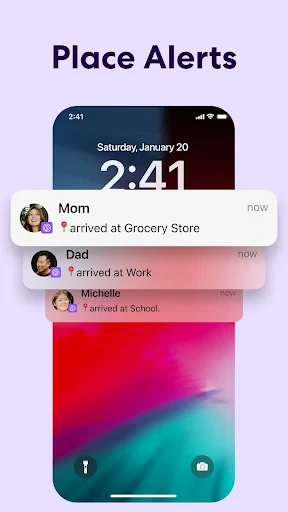
One of the standout features of Life360 is its real-time location sharing. Imagine being able to check in on your kids en route from school or seeing if your partner's stuck in traffic without bombarding them with calls. The app uses GPS technology to update locations seamlessly, and you can even set up geofencing alerts. So, if junior leaves the school premises, you get a notification faster than you can say "homework."
But wait, there's more! Life360 isn’t just about keeping tabs on where everyone is. Its driving safety features are a real game changer. You can receive alerts about driving habits, such as speed, phone usage, and even hard braking. It’s like having a co-pilot who doesn’t nag but still keeps everyone safe.
A Couple of Minor Hiccups to Know About
Like any app, Life360 isn’t without its hiccups. While the location accuracy is generally spot on, there are moments when it feels like the GPS is having a lazy day, showing slightly off locations. It’s rare but can be a tad frustrating if you’re relying on it for precise tracking.
Another point to consider is battery consumption. With continuous GPS usage, you might notice your phone’s battery draining faster than usual. A small price for peace of mind, perhaps?
The Final Verdict on Family Connectivity
All things considered, Life360 offers a comprehensive suite of features that can make family coordination a breeze. It’s like having a digital family bulletin board right in your pocket. Whether you’re a parent keeping tabs on your kids or just want to make sure everyone’s safe and sound, Life360 is a solid choice.
As someone who’s now used Life360, I can say it’s like inviting a digital guardian into your life, one that respects privacy while providing safety. So, if you're looking for an app that helps you stay connected and safe, give Life360 a whirl. You might just find it’s the family member you didn’t know you needed.
Happy connecting, and stay safe out there
Advantages
- Real-time location sharing for families.
- Battery-saving location updates.
- SOS alert feature for emergencies.
- Driving reports for safe driving insights.
- Private chat for family communication.
Disadvantages
- Requires constant internet connection.
- Subscription needed for premium features.
- Location accuracy can vary.
- Consumes battery with constant use.
- Privacy concerns with location sharing.
Frequently Asked Questions
Q: What is Life360 and how does it work?
A: Life360 is a family networking app designed to keep families connected. It offers real-time location sharing, driving reports, and emergency alerts. By creating Circles, users can share their location with family members, ensuring peace of mind and enhancing safety. The app uses GPS technology to provide accurate location information.
Q: Is Life360 free to use?
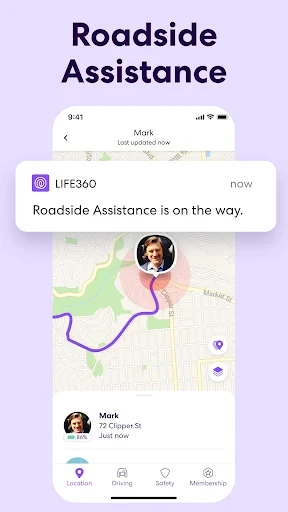
A: Life360 offers a free version with basic features like location sharing and limited alerts. However, it also has premium plans, such as Life360 Plus and Life360 Driver Protect, which provide additional features like location history, driver reports, and roadside assistance. Users can choose a plan based on their needs and budget.
Q: How secure is my data on Life360?
A: Life360 prioritizes user privacy and data security. It uses encrypted channels to transmit data and has strict privacy policies in place. Users have control over who sees their location and can easily adjust privacy settings. It's important to review these settings to ensure your data is shared only with trusted individuals.
Q: Can Life360 be used internationally?
A: Yes, Life360 can be used internationally, making it ideal for families with members in different countries. The app works wherever there is an internet connection, and location sharing functions seamlessly across borders. However, users should be aware of any potential roaming charges when using mobile data abroad.
Q: What devices are compatible with Life360?
A: Life360 is compatible with both Android and iOS devices, providing a seamless experience across different platforms. It's important to ensure that your device meets the minimum operating system requirements to use the app effectively. Regular updates are recommended to access the latest features and improvements.
Technical Information
Recommended for You

DailyGift: Earn Reward

Hallow: Prayer & Meditation

Asana: Where work connects

Voice Changer AI, Sound Effect

WPS Office-PDF,Word,Sheet,PPT

ChatOn - AI Chat Bot Assistant

My Aurora Forecast & Alerts

Cricket Line Guru

RadarNow! ®

Pixilart - Make Pixel Art

Blend Photos - Photo Blender

FIFA+ | Football streaming app

Sydney Health

Truist Mobile

IQ Masters - Brain Games

CryAnalyzer - baby translator

GPS Phone Location Tracker

MEXC: Buy Bitcoin BTC & Crypto

MyRadar Weather Radar

AMarkets: Trade & Invest

Cut and Paste Photo Editor

Valley Metro

Car-Part.com Used Auto Parts
