
Homes.com Real Estate Search
Find Your Perfect Home For Sale Or Rent
Screenshots


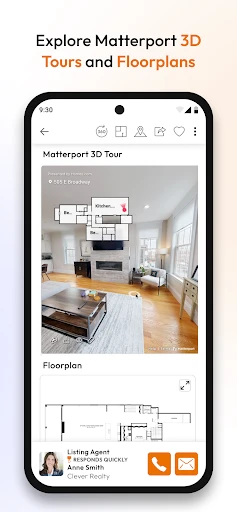
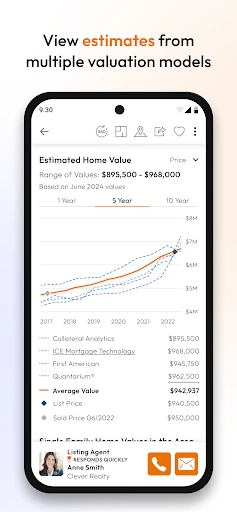

Your Pocket-Sized Real Estate Agent: A Look at Homes.com
Imagine you're on the hunt for your dream home, and you have this handy tool right in your pocket. That's exactly what Homes.com Real Estate Search offers. It's like having a personal realtor, but without the constant back-and-forth calls or emails. The app is a comprehensive platform designed to make your property search as smooth as possible, whether you're buying, renting, or just plain curious.
What Makes This App Special
First off, the app's user interface is super slick and intuitive. You know how some apps just seem to get what you need without you having to dig through endless menus? Homes.com nails that experience. The search functionality is robust, allowing you to filter properties based on price, number of bedrooms, bathrooms, and even specific amenities like a pool or fireplace. It's like telling the app, "Show me the good stuff," and it delivers without missing a beat.
Handy Tools You'll Actually Use
One of the standout features of Homes.com is its Snap & Search option. Imagine walking down a street, spotting a "For Sale" sign, and simply snapping a picture to get all the listing details. It feels a bit futuristic, doesn’t it? This feature alone can save you tons of time and effort, especially if you're someone who loves exploring neighborhoods on foot.
Another cool feature is the commute calculator. If you're like me and dread the idea of a long commute, this tool lets you input your workplace address and see how far potential homes are, along with estimated travel times. This is a game-changer for anyone prioritizing work-life balance.
Staying Ahead in Your Home Search
Homes.com also offers real-time alerts. So, if a property that fits your criteria hits the market, you're instantly notified. It's like having a vigilant friend who’s always on the lookout for you. Plus, with market trends and neighborhood insights, you’re equipped with valuable information to make informed decisions.
The app also makes it easy to save your favorite listings and share them with friends or family. This can be particularly useful if you're making a decision with a partner or just want a second opinion. You can also reach out directly to agents through the app, streamlining communication and making the whole process a lot less stressful.
A User's Perspective on the App
Personally, I found navigating Homes.com to be a breeze. The app didn’t freeze or lag, which is a huge plus when you're trying to make quick decisions. The property images were high quality, and the detailed descriptions gave me a clear idea of what to expect. It's like having all the information you need in the palm of your hand, without the hassle of multiple tabs or windows open.
One thing I appreciated was how the app respects your privacy. No annoying pop-ups asking for unnecessary permissions. It asks for what it needs to function effectively and nothing more, which is a refreshing change in today’s app market.
Overall, Homes.com Real Estate Search is a must-have for anyone in the market for a new home. It's user-friendly, packed with useful features, and offers a seamless experience from start to finish. Whether you're a first-time buyer or a seasoned investor, this app makes the property search process feel less like a chore and more like an adventure.
So, if you're ready to find your next home or just want to keep an eye on the market, give Homes.com a try. You might just find that perfect place you've been dreaming about.
Advantages
- User-friendly interface for easy property searches.
- Comprehensive listings with detailed property info.
- Advanced search filters for personalized results.
- Real-time updates on new listings and price changes.
- Direct contact options with property agents.
Disadvantages
- Limited international listings
- mostly U.S. focused.
- Some users report occasional app crashes.
- In-app ads can be intrusive at times.
- Limited offline functionality for saved searches.
Frequently Asked Questions
Q: What features does the Homes.com Real Estate Search app offer?
A: The Homes.com Real Estate Search app provides users with a comprehensive set of features for finding and researching properties. Users can search for homes by location, price, and property type, view detailed property descriptions, photos, and maps, and even save their favorite listings for future reference. Additionally, the app offers mortgage calculators and a feature to connect with real estate agents.
Q: Is the Homes.com Real Estate Search app free to use?
A: Yes, the Homes.com Real Estate Search app is free to download and use. However, while the app itself does not charge users, there may be additional costs associated with purchasing a property or using certain premium features that require payment. Users should check the app store for any in-app purchases or subscription information.
Q: Can I contact real estate agents directly through the app?
A: The Homes.com Real Estate Search app allows users to easily contact real estate agents directly through the app. Users can send messages or make calls to agents listed on properties they are interested in. This feature facilitates communication and makes it easier for potential buyers to get more information or schedule viewings.
Q: Does the app provide information on neighborhoods and local amenities?
A: Yes, the Homes.com Real Estate Search app offers detailed information about neighborhoods and nearby amenities. Users can explore neighborhood profiles, which include data on schools, safety ratings, and local attractions. This helps users make informed decisions about prospective areas and ensures they find a home in a community that suits their lifestyle.
Q: Is the Homes.com Real Estate Search app available for both Android and iOS devices?
A: The Homes.com Real Estate Search app is available for both Android and iOS devices. Users can download the app from the Google Play Store or the Apple App Store. The app is designed to provide a seamless experience across both platforms, ensuring users have access to its features regardless of the device they use.
Technical Information
Recommended for You

Anime AI - Photo Maker

Temp Mail - Temporary Email

Night Owl Protect

Color Phone Call Screen App

Hardee’s®

athenaPatient

Voice Changer by Sound Effects

Clipboard

Wallpapers: 4K Live Wallpapers

Camera for S23 - Galaxy Camera

Galatea: Books & Audiobooks

Ultimate Cleaner Pro

مایکت فیلم | Myket Film

AVG AntiVirus & Security

Glitter Wallpaper: Theme, Icon

beIN SPORTS

6Minutes - Local News & Alerts

Buenos días tardes y noches

Monster Job Search

Virtual Hair Style Changer

X Browser - Private & Fast

Prankster-Funny Prank Sounds

Straight Arrow News
