
EasyTether Pro
EasyTether Pro shares phone internet with computers
Screenshots
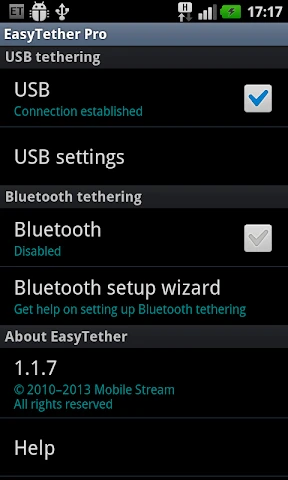
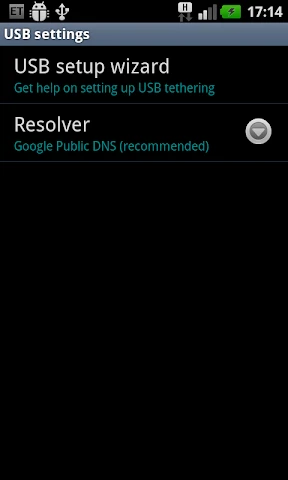
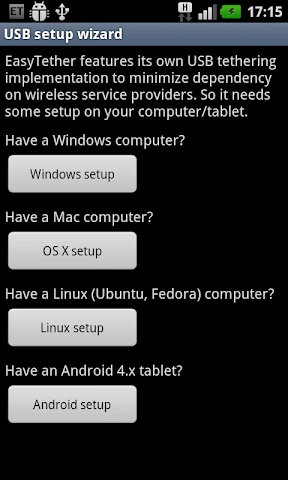
My Experience with EasyTether Pro
Getting Everything Set Up
First off, getting EasyTether Pro up and running was a lot easier than I expected. I'm not the most tech-savvy person, but the app walked me through it without any fuss. All it took was a USB cable, my phone, and my computer. After I installed the drivers (the app gives you the links right there), I was pretty much good to go. It's cool that it works with so many things, like Windows, Mac, Linux, and even some game consoles.
Tethering Made Simple
The best part about EasyTether Pro is how simple it is to use. Once I had it all configured, getting my computer online was a breeze. I just opened the app, plugged in my phone, and that was it—my laptop was using my phone's internet. This was a total game-changer for those times when my home internet just stopped working for no reason.
The speed was pretty good, too. It obviously depends on your mobile signal and data plan, but for me, watching videos and surfing the web was smooth. I didn't really run into any major lag or connection problems, which was a nice surprise.
Compatibility and Performance
I was also really impressed with how well it worked on different devices. Whether I was on a Windows PC or a MacBook, EasyTether Pro handled it without a hitch. I even got it to work on a Linux machine, and it was just as easy. The app says it can also connect to Xbox and PlayStation, though I didn't get around to testing that part.
In terms of performance, EasyTether Pro was reliable. The connection stayed strong the whole time I was using it, and it never just dropped out on me. One thing to keep in mind is that it can use up your phone's battery a bit faster, so it's a good idea to have it charging while you tether.
Final Thoughts
All in all, EasyTether Pro is a really solid app if you want to use your phone as a modem. It's easy to figure out, works well, and plays nice with lots of different gadgets. It's not a free app, but for the convenience it gives you, the price is totally worth it if you regularly need internet on other devices.
If you often find yourself stuck without Wi-Fi, EasyTether Pro could be that handy tool you've been missing. From what I've seen, it's definitely worth trying out.
Advantages
- Stable tethering connection
- No root access needed
- Supports multiple devices
- Compatible with major carriers
- Easy to set up
Disadvantages
- Paid app
- Limited customer support
- No iOS version available
- Requires initial configuration
- Consumes battery quickly
Frequently Asked Questions
Q: What is EasyTether Pro and how does it work?
A: EasyTether Pro is an application that allows you to share your smartphone's internet connection with your computer or tablet via USB or Bluetooth tethering. It works by creating a secure connection between your devices, enabling internet access on your secondary device without needing a separate data plan.
Q: Is EasyTether Pro compatible with all smartphones and computers?
A: EasyTether Pro is compatible with most Android smartphones and supports Windows, macOS, and Linux operating systems. However, it is always recommended to check the specific compatibility with your device model and operating system version to ensure seamless functionality.
Q: Does EasyTether Pro require root access to function?
A: No, EasyTether Pro does not require root access to function. It is designed to work on non-rooted devices, making it accessible to a broader range of users who may not want to modify their device's operating system.
Q: Are there any data usage limitations with EasyTether Pro?
A: While EasyTether Pro itself does not impose data usage limits, your mobile carrier may have restrictions or charges for tethering. It's important to review your carrier's policy on data sharing to avoid any unexpected fees or throttling of your internet speed.
Q: How do I install and set up EasyTether Pro on my devices?
A: To install EasyTether Pro, download the app from the Google Play Store on your Android device. Then, follow the on-screen instructions to connect your phone to your computer via USB or Bluetooth. Additional setup may be required on your computer, such as installing drivers or configuration software, which are available on the EasyTether website.
Technical Information
Recommended for You

Budget Car Rental

LightCut -AI Auto Video Editor

Compass app - Accurate Compass

Yandex Browser with Protect

Gap

Zocdoc - Find and book doctors

Electrify America

USB Connector Cast Phone to TV

KineMaster - Video Editor

Huntington Mobile Banking

ChowNow: Local Food Ordering

Pashto short stories پښتو قیصی

Fog of World

FlightAware Flight Tracker

Zoom for Chromebook

Job Hai - Search Job, Vacancy

Google Play Store

ShopBack: Cashback & Rewards

AI Chat・Ask Chatbot Assistant

Be Closer: Family location

Phone Tracker and GPS Location

Farmacias del Ahorro

FedEx Mobile
