
Cartoon Comic Strip Maker
Create Fun Comic Strips For Everyone
Screenshots

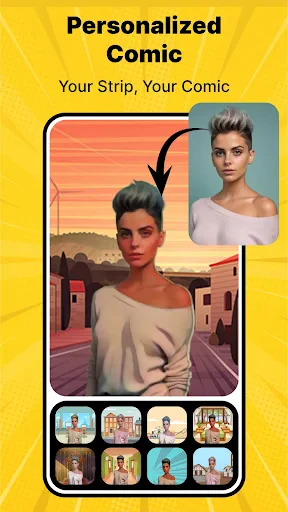

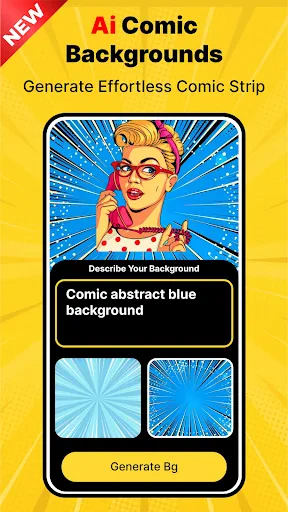
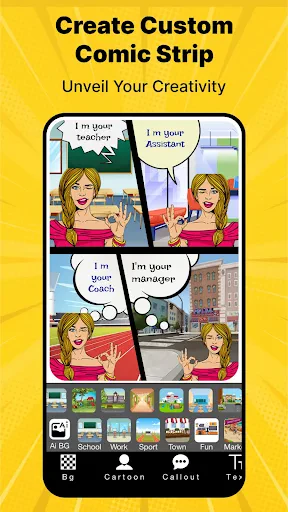
Bring Your Own Comic Strip to Life
Have you ever dreamed of making your own comic strip, just like the ones you'd find in the Sunday funnies? Let me tell you about the Cartoon Comic Strip Maker app. It's a super fun and flexible tool that lets you design your very own comic strips directly from your phone or tablet. Whether you're a budding artist or just looking for a new hobby, this app gives you a cool and easy way to tell your stories with pictures.
A Smooth and Easy Start
The very first thing you'll see when you open the Cartoon Comic Strip Maker is how simple it is to use. It's built so that anyone can jump right in, even if you've never made a comic before. The home screen is straightforward, letting you begin a new comic or pick up an old one. There's even a handy guide that walks you through the first steps, which was a big help when I was just starting out.
The app comes with a bunch of ready-to-use templates, which is awesome if you're not sure how to begin. You can pick from different frame layouts, change their sizes, and even play around with the background colors. It's like having a blank slate where your imagination can run wild.
Tools and Features: Let Your Creativity Shine
This app is loaded with all sorts of tools and options to help you build your comic world. There's a huge collection of pre-drawn characters and items, perfect for quickly filling your scenes. But if you're feeling original, you can draw your own characters using the built-in drawing tools. These tools are pretty advanced, offering different brushes, colors, and layers to work with.
Putting words in your comic is also really simple. You can select from a variety of speech bubble shapes and text fonts, making it easy to add conversations and captions. I had a lot of fun trying out different fonts to give each character their own personality.
Sharing Your Masterpiece
After you've finished your comic strip, sharing it with everyone is just a tap or two away. The app lets you save your work in different file types, great for posting on social media or even printing out. It felt really rewarding to see my creation finished and ready to show off to friends or post online.
Plus, the app works smoothly with sites like Instagram, Facebook, and Twitter, so you can show your comics to a wide audience without any trouble. This is ideal for anyone wanting to build a collection of their work or just share their creative ideas with the world.
Overall, the Cartoon Comic Strip Maker app is an excellent choice for anyone who wants to make comics. Its easy-to-use design, combined with a ton of creative features, makes it great for both newbies and experienced creators. Whether you're putting together a quick joke strip or a more detailed story, this app has all you need to make your ideas real. So why not download it and begin drawing your own comic adventures today?
Advantages
- User-friendly interface for easy creation
- Wide variety of customizable templates
- Rich library of characters and props
- Export options in multiple formats
- Regular updates with new features
Disadvantages
- Limited free version features
- Occasional app crashes reported
- In-app purchases can be pricey
- Requires internet for some features
- Ads can be intrusive at times
Frequently Asked Questions
Q: What features does Cartoon Comic Strip Maker offer?
A: Cartoon Comic Strip Maker provides a range of features including customizable templates, a variety of comic characters, speech bubbles, and backgrounds. Users can easily drag and drop elements to create personalized comic strips. It also offers text editing tools, color adjustments, and sharing options to publish your creations on social media platforms.
Q: Is Cartoon Comic Strip Maker free to use?
A: Cartoon Comic Strip Maker offers a freemium model. While the basic version is free and includes essential features, some advanced features and additional content packs may require in-app purchases or a subscription. Users can choose to upgrade for a more enhanced experience, but the free version is sufficient for beginners.
Q: Can I use my own images in Cartoon Comic Strip Maker?
A: Yes, Cartoon Comic Strip Maker allows users to import their own images to incorporate into comic strips. This feature enables a more personalized touch to your creations, allowing you to blend personal photos with the app's templates and graphics. It's a great way to make your comics uniquely yours.
Q: Is Cartoon Comic Strip Maker suitable for children?
A: Cartoon Comic Strip Maker is designed to be user-friendly and is suitable for children and adults alike. The app includes simple, intuitive controls and a safe environment for kids to explore their creativity. Parents can rest assured that the content is appropriate, and it's a fun way for kids to learn storytelling.
Q: How can I share my comic strips created in Cartoon Comic Strip Maker?
A: The app makes sharing your creations easy by providing direct sharing options to various social media platforms like Instagram, Facebook, and Twitter. Additionally, you can save your comic strips to your device and share them via email or messaging apps. This flexibility ensures your comic reaches a wider audience.
Technical Information
Recommended for You

Vehicleinfo - RTO Information

Travelocity Hotels & Flights

iVisa: ETA, eVisa, NZeTA, Visa

Hush: Android Auto Audio Fix

Papa Johns Pizza & Delivery

Tides Near Me

Pro Credit Card Reader NFC

Magic Doodle: Glow Art Drawing

Second Number for Call & Text

Likee - Short Video Community

The Book of Mormon

LEGO® Play

Hard Rock Bet: Betting, Casino

Microsoft Launcher

Goods Unite Us

Aetna Better Health - Medicaid

Copy My Data: Transfer Content

TanTan - Asian Dating App

MSC for Me

Kitchen Design: 3D Planner

ZArchiver

Mayo Clinic

Soundcore
