
TeslaMirror
Drive Tesla Cars On Your Phone
Screenshots
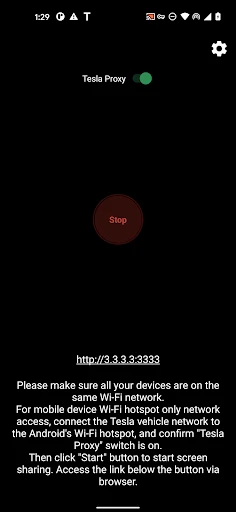

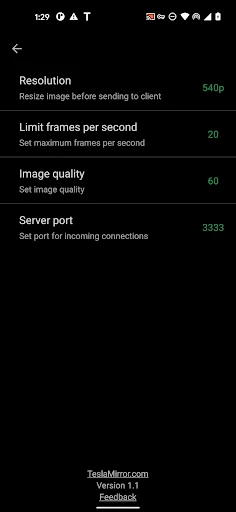

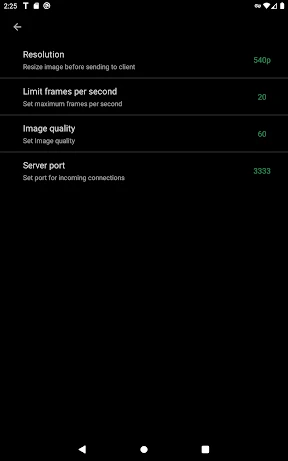
Control Your Tesla with a Swipe: Introducing TeslaMirror
Have you ever wished you could manage your Tesla with just a few taps on your phone? That's the promise of TeslaMirror, an app for Android and iOS that links directly to your car. It turns your smartphone into a powerful remote control, offering a suite of features that make owning a Tesla feel even more futuristic.
Getting Your TeslaMirror App Up and Running
Getting started with TeslaMirror is straightforward. After you download it from the app store, simply sign in using your Tesla account details. The app will quickly connect to your car, and just like that, you're all set to start using it.
The app's design is clean and easy to understand. It's clear the creators focused on making it simple for everyone to use. The main screen shows you all the key details about your car, like the battery level and whether the doors are locked, putting most remote functions right at your fingertips.
Exploring the App's Handy Functions
A major highlight is the remote control feature. You can cool down your car on a scorching day or warm it up on a cold morning—all before you even step outside. The climate control responds instantly with just one tap.
You can also lock and unlock your car from anywhere. If you often second-guess whether you locked it, this feature is a real worry-saver. The app will even alert you if something seems off, providing extra security when you're not with your vehicle.
Another great tool is the real-time location tracking. If you've parked in a huge garage or let a friend borrow your car, you can see its exact location anytime. It’s like having a dedicated GPS tracker, so you're never left wondering.
How the App Performs and Feels
In daily use, TeslaMirror operates smoothly without any frustrating delays. The team behind the app has done a great job making it work well on both Android and iOS. During testing, it proved to be dependable, with commands being carried out without a hitch.
The app is also a breeze to navigate. The layout makes sense, and the features you need most are always easy to find. Whether you're on an iPhone or an Android device, the experience is consistently simple and intuitive.
Wrapping Up Our TeslaMirror Review
To sum it up, TeslaMirror is an essential download for Tesla owners. It perfectly blends convenience with modern tech, putting total control of your vehicle in the palm of your hand. While other apps offer similar connectivity, TeslaMirror distinguishes itself with its polished design and comprehensive set of features.
So, if you want to get more from your Tesla, give TeslaMirror a look. It’s not just an app; think of it as your personal co-pilot for the road.
Advantages
- Seamless integration with Tesla vehicles.
- Supports both Android and iOS devices.
- User-friendly interface and navigation.
- Real-time data display from the car.
- Customizable display settings.
Disadvantages
- Limited compatibility with older Tesla models.
- Requires stable internet connection.
- High battery usage during operation.
- Limited third-party app support.
- Subscription required for premium features.
Frequently Asked Questions
Q: What is TeslaMirror and how does it work?
A: TeslaMirror is an innovative application that allows users to mirror their smartphone screen directly onto the Tesla infotainment system. By using this app, Tesla owners can display various apps and media from their phone to the car's screen, enhancing the in-car entertainment experience. It works through a simple pairing process, ensuring seamless connectivity and interaction between the mobile device and the car's system.
Q: Is TeslaMirror compatible with all Tesla models?
A: TeslaMirror is designed to be compatible with most Tesla models that feature the latest infotainment systems. However, compatibility may vary depending on the specific model and software version of your Tesla. It's advisable to check on the app's official page or with your Tesla model specifications to ensure full compatibility and functionality before downloading.
Q: Does TeslaMirror require any special hardware or accessories?
A: To use TeslaMirror, you generally do not need any additional hardware or accessories. The app utilizes the existing Bluetooth or Wi-Fi connectivity options available in your Tesla vehicle. However, for optimal performance, ensuring that your car's software is up-to-date and your smartphone's operating system is compatible is recommended. This minimizes connectivity issues and enhances the mirroring experience.
Q: Are there any privacy concerns when using TeslaMirror?
A: TeslaMirror prioritizes user privacy and security. The app only mirrors the content you choose to display and does not store or transmit personal data beyond the required connectivity functions. Users should be mindful of the content displayed, especially if there are concerns about privacy with passengers in the vehicle. The app adheres to strict privacy policies to ensure user data remains secure.
Q: Is TeslaMirror a free app, or does it require a subscription?
A: TeslaMirror offers a free version with basic features that allow users to mirror their screens. However, for enhanced features and an ad-free experience, there may be a premium version available that requires a subscription. It's best to review the app's pricing structure and features on the app store or the official website to understand what each version offers before making a decision.
Technical Information
Recommended for You

OpenCPN

Live Football TV Streaming HD

SmugMug - Photography Platform

Mercado Libre: Compras online

Pregnancy Fingerprint Fun Test

Île-de-France Mobilités

Ghost Detector Real Life Radar

AntiVirus Toolkit

PayByPhone

Avast SecureLine VPN & Privacy

Mini Piano Lite

Doctoralia: pide citas médicas

Buffalo Wild Wings Ordering

HP Print Service Plugin

Music Maker JAM: Beatmaker app

Easy Metronome

Android Auto

Kiwi Browser - Fast & Quiet

Invoice2go: Easy Invoice Maker

Baby Photo Editor

Poweramp: Music Player (Trial)

PlantSnap: plant identifier

Cittamobi: Ônibus e Trilhos
