
Infocar - OBD2 ELM Scanner
Car Doctor Diagnose Vehicle Issues Anywhere
Screenshots
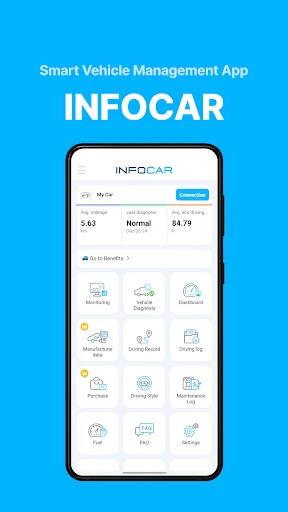

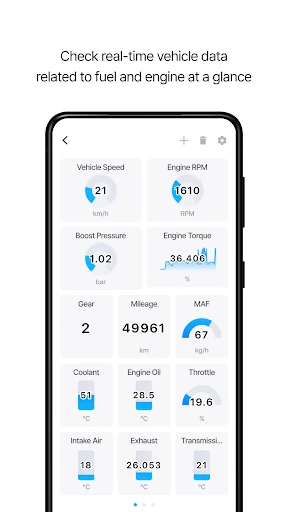


Ever had that moment when your car starts acting up and you wish you could just have a conversation with it to figure out what's wrong? Well, that's where Infocar - OBD2 ELM Scanner comes into play. This app is like having a personal mechanic right in your pocket, ready to diagnose your vehicle with just a few taps on your smartphone.
Getting Your Infocar Scanner Up and Running
First things first, let's talk about setting this bad boy up. The Infocar - OBD2 ELM Scanner app is available for both Android and iOS, which is a huge plus. You just need to download the app, pair it with an OBD2 ELM device (which, by the way, is super easy to find online or at your local auto shop), and you're all set. The interface is intuitive, so you don't have to be a tech whiz to get it going.
A Closer Look at What It Can Do
Once you're connected, the app opens up a world of automotive insights. It reads diagnostic trouble codes (DTCs), gives you real-time data on your car's performance, and even offers suggestions on how to fix issues. It's like having a personal pit crew. What I love most is the real-time dashboard feature. You can customize it to display everything from speed and fuel economy to engine RPMs. It’s a game-changer for those of us who like to keep a close eye on our car's performance.
Another cool feature is the app's ability to record trips. This is especially handy if you're trying to monitor your driving habits or calculate fuel efficiency over time. The data is laid out in easy-to-read graphs and charts, making it simple to track your progress and make informed decisions about your driving.
Navigating the App's Layout and Feel
The design of the app is sleek and modern, which I appreciate. It's not cluttered with ads or unnecessary features, so you can focus on what really matters - your car. The navigation is smooth, and I didn't encounter any bugs or crashes during my time using it. The developers clearly put a lot of thought into creating a seamless user experience.
One thing to note is that while the basic features are free, there are some premium features that come at a cost. However, the free version is robust enough for most users, and the premium features are reasonably priced considering the value they add.
Wrapping Up the Infocar Experience
In a nutshell, if you're a car enthusiast or just someone who wants to keep tabs on your vehicle's health, the Infocar - OBD2 ELM Scanner is a must-have app. It's convenient, reliable, and packed with features that make car diagnostics a breeze. Plus, the peace of mind you get from knowing what's going on under the hood is absolutely priceless. Give it a spin and see for yourself - you won't be disappointed!
Advantages
- User-friendly interface for all users.
- Comprehensive car diagnostics provided.
- Real-time data monitoring available.
- Compatible with most car models.
- Detailed vehicle health reports.
Disadvantages
- Requires OBD2 adapter for use.
- Limited features in free version.
- Can drain phone battery quickly.
- Data updates may be slow at times.
- Some features require internet.
Frequently Asked Questions
Q: What is Infocar - OBD2 ELM Scanner used for?
A: Infocar - OBD2 ELM Scanner is a powerful diagnostic tool designed for car enthusiasts and mechanics. It connects to a vehicle's onboard diagnostic system via an OBD2 adapter, allowing users to monitor real-time car performance metrics, diagnose engine issues, and access a wide array of vehicle information directly from their smartphone.
Q: Is Infocar - OBD2 ELM Scanner compatible with all cars?
A: While Infocar - OBD2 ELM Scanner is compatible with most vehicles manufactured after 1996, which usually support the OBD2 protocol, it's important to check if your specific car model is supported. Compatibility can vary based on the vehicle's make, model, and year. Users should verify the support list provided by the app or consult their vehicle's manual.
Q: Do I need any additional equipment to use Infocar - OBD2 ELM Scanner?
A: Yes, to use Infocar - OBD2 ELM Scanner, you will need an OBD2 adapter. This adapter plugs into the vehicle's OBD2 port, which is usually located under the dashboard. The adapter communicates with the app via Bluetooth or Wi-Fi, allowing you to use your smartphone to access vehicle data and diagnostics.
Q: How user-friendly is Infocar - OBD2 ELM Scanner for beginners?
A: Infocar - OBD2 ELM Scanner is designed with an intuitive interface that is user-friendly for both beginners and experienced users. It offers clear instructions and easy-to-navigate menus that help users quickly learn how to perform diagnostics and interpret vehicle data without requiring prior automotive knowledge.
Q: Does Infocar - OBD2 ELM Scanner require an internet connection to function?
A: Infocar - OBD2 ELM Scanner primarily relies on the Bluetooth or Wi-Fi connection between your smartphone and the OBD2 adapter, so it does not require an internet connection for basic functionalities. However, for features like app updates or accessing additional resources, an internet connection may be necessary.
Technical Information
Recommended for You

Recreation.gov

Hairstyles for short hair

Aura: Security & Protection

Duo Mobile

Cleanfox - Mail & Spam Cleaner

DSM-5-TR® Diagnostic Criteria

Alibaba.com - B2B marketplace

NYU Langone Health

Black Light

Contraction Timer & Counter

Pura

App Lock - Fingerprint Lock

Immobiliare.it - Indomio

AR Ruler App: Tape Measure Cam

UFC

YI IoT

Spin - Electric Scooters

House Chores Cleaning Schedule

Timemark: Photo Proof

Hawaiian Airlines

Resume - Intelligent CV maker

Weather Radar - Windy, rain ra

AI Art Generator: Photo, Draw
