
ibis Paint
Professional drawing app for artists and creators
Screenshots

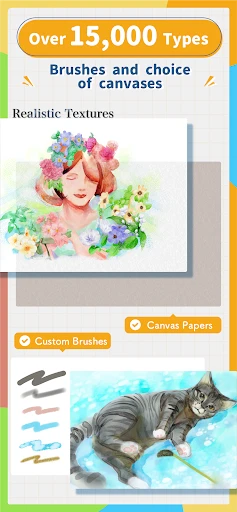

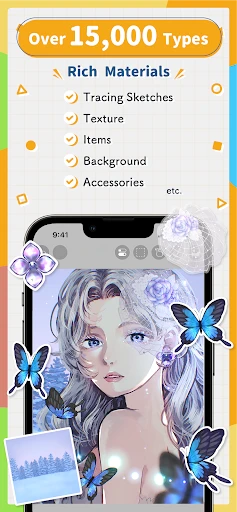

Have you ever found yourself doodling on the corner of a notebook, wishing you could bring your creations to life with a splash of color and professional touch? Well, let me introduce you to ibis Paint, an app that’s making waves in the digital drawing community. I’ve taken it for a spin, and here’s how it went down.
Getting the Hang of ibis Paint
First things first, getting ibis Paint on your phone is a total breeze. You can grab it from the app store on either Android or iOS, no problem. Once it's installed, the layout is super straightforward. You won't get lost trying to find the tools you need, which is awesome when you just want to start drawing right away without any fuss.
The Cool Tools You Get to Play With
So, what makes this app fun to use? For starters, it comes with a massive collection of brushes—over 300 of them! And you can tweak each one to get the exact look you're going for, whether it's a sharp ink line or a soft watercolor wash. It honestly feels like carrying a full art kit in your pocket. I tried out a bunch, and they're great for everything from quick sketches to more polished pieces.
Another super helpful feature is layers. You can stack as many as you want, which is perfect for building up your drawing without messing up what you've already done. And get this—you can even make simple animations with up to 60 frames. That means you can bring your drawings to life, which I thought was a really neat bonus for anyone curious about animation.
Watch Your Art Unfold in Fast-Forward
If you enjoy showing people how you make your art, you're going to love this. The app can record a time-lapse video of your entire drawing process. It's really satisfying to see your artwork develop from a blank canvas to a finished piece in just a few seconds, and it's a fantastic way to share your creative journey online.
Joining a World of Fellow Artists
A big part of what makes ibis Paint special is its community. The app has its own social space where you can post your work, see what others are creating, and pick up tips and tricks. It's like having an art club that's always open, where you can improve your skills and meet other creative people. There are also tons of guides to help you learn, whether you're just starting out or you've been drawing for years.
Wrapping It All Up
To sum it up, ibis Paint is a seriously impressive drawing app that has something for everyone. No matter if you're just sketching for fun or working on a detailed project, this app has the tools to help you out. It's user-friendly, loaded with features, and backed by a community that's all about sharing and inspiration. If you haven't checked it out yet, I'd say go for it. Your new go-to art app might be waiting for you right on your phone
Advantages
- Wide range of brushes and tools.
- User-friendly interface.
- High customizability.
- Frequent updates.
- Supports large canvas sizes.
Disadvantages
- Ads in free version.
- Steep learning curve.
- In-app purchases.
- Occasional lag on older devices.
- Limited text editing features.
Frequently Asked Questions
Q: What is ibis Paint, and what are its primary features?
A: ibis Paint is a versatile drawing app designed for artists of all levels, offering over 2500 materials, 800 fonts, 381 brushes, 71 filters, 46 screen tones, and 27 blending modes. It supports stroke stabilization, various ruler features like symmetry rulers and radial line rulers, and clipping mask features. Its real-time brush preview and layers features make it a powerful tool for creating detailed artwork.
Q: Is ibis Paint available for both Android and iOS devices?
A: Yes, ibis Paint is available for both Android and iOS devices. Users can download it from the Google Play Store for Android devices or the Apple App Store for iOS devices. The app is designed to offer a seamless drawing experience across different platforms, ensuring that artists can work on their projects regardless of the device they use.
Q: Does ibis Paint support importing and exporting artwork in various formats?
A: ibis Paint supports a variety of file formats for importing and exporting artwork. Users can save their projects in formats such as PNG, JPEG, and PSD, which allows for compatibility with other graphic design software. This flexibility in file management makes it easier for artists to share their work or continue editing on different platforms.
Q: Are there in-app purchases or subscription fees associated with ibis Paint?
A: While ibis Paint is free to download, it offers in-app purchases and a premium subscription option. The free version includes ads and limits some features, whereas the paid version removes ads and unlocks additional functionality. Users can choose to buy specific brushes or tools, or subscribe to the premium version for a more comprehensive experience.
Q: How user-friendly is ibis Paint for beginners?
A: ibis Paint is designed to be user-friendly, with a comprehensive yet intuitive interface that caters to beginners and advanced users alike. The app provides tutorials and a supportive online community where new users can learn tips and tricks. Its easy-to-navigate layout and helpful features make it accessible for those just starting their digital art journey.
Technical Information
Recommended for You

Clipboard

Halara

SeatGeek – Tickets to Events

Cafe - Live video chat

Medium

PAeDocket

Tropical Smoothie Cafe

My Earthquake Alerts - Map

Ank ScanMaster

MoonPay: Buy Crypto & Bitcoin

Listen Audiobook Player

Contraction Timer & Counter 9m

T.J.Maxx

Macy's: Online Shopping & Save

Women's Bible-Daily Pray

Solo: Your Gig Business App

Textify- Art Font Photo Editor

MD307 Digital watch face

AppBarber: Cliente

ALDI USA

what3words: Navigation & Maps

Leonardo.Ai - Image Generator

FlashGo: Fake GPS Location
